


Buying Signals: Spot Them Early and Win More B2B Deals
Every day your prospects are showing you they want to buy. Not with words. With actions.
A pricing page visited three times in one afternoon. A big funding round just announced. A new VP of Sales hired six weeks ago. A competitor mentioned on a sales call. These are buying signals. The teams that catch them first win the deals that everyone else finds out about too late.
This guide explains what buying signals are, how to find them before your rivals do, which tools help, and how to respond fast enough to actually close the deal.
What Are
Signals?
A buying signal is any action or data point that shows a prospect is getting ready to buy. It replaces guesswork with something you can actually see and act on.
Think of it this way. Instead of a rep saying "I have a good feeling about this account," they say "this company hit our pricing page four times today and their CEO just posted about switching tools." That is the difference. One is a hunch. The other is a signal.
Buying signals show up in three ways.
Verbal signals are things a prospect says on a call or in a message. "We're switching vendors this quarter." "We have budget set aside for this." These are the strongest signals but you only hear them once a conversation has already started.
Behavioral signals are things a prospect does without saying anything. Visiting your pricing page multiple times. Downloading a competitor comparison guide. Replaying a product demo. Most teams miss these because they don't have the right tracking set up.
Intent signals come from outside sources. A company that just raised a funding round. A new VP of Sales hired last month. A score from a tool like 6sense or Bombora showing the company is researching products like yours right now.
According to Gong's research on sales conversations, responding to a buying signal within five minutes makes a huge difference compared to waiting hours. The signal fades fast. So does the window to act.
Why Buying Signals Matter for Your Team
For sales and revenue operations teams at early-stage SaaS companies, buying signals are the fastest way to close more deals without spending more money to find new leads.
If you want the full breakdown by type, we maintain a signals library covering each one.
Companies that focus on real-time B2B buying signals see 26% higher rates of turning qualified leads into closed deals, according to Forrester (opens in new tab). Average sales cycles drop from 78 to 54 days when teams respond to signals the same day. Your reps spend time on people who are already looking to buy, which costs less and converts more.
For operations teams, buying signals also solve a common problem. Marketing, sales, and customer success often work from different data. When a signal fires, everyone knows exactly what happened, who owns the response, and what to do next.
This connects directly to intent-based marketing, which is the practice of reaching buyers at exactly the right moment instead of blasting everyone with the same message.
Five Types of Buying Signals Worth Tracking
Not every signal means the same thing. Here is how they rank by how strongly they predict a sale.
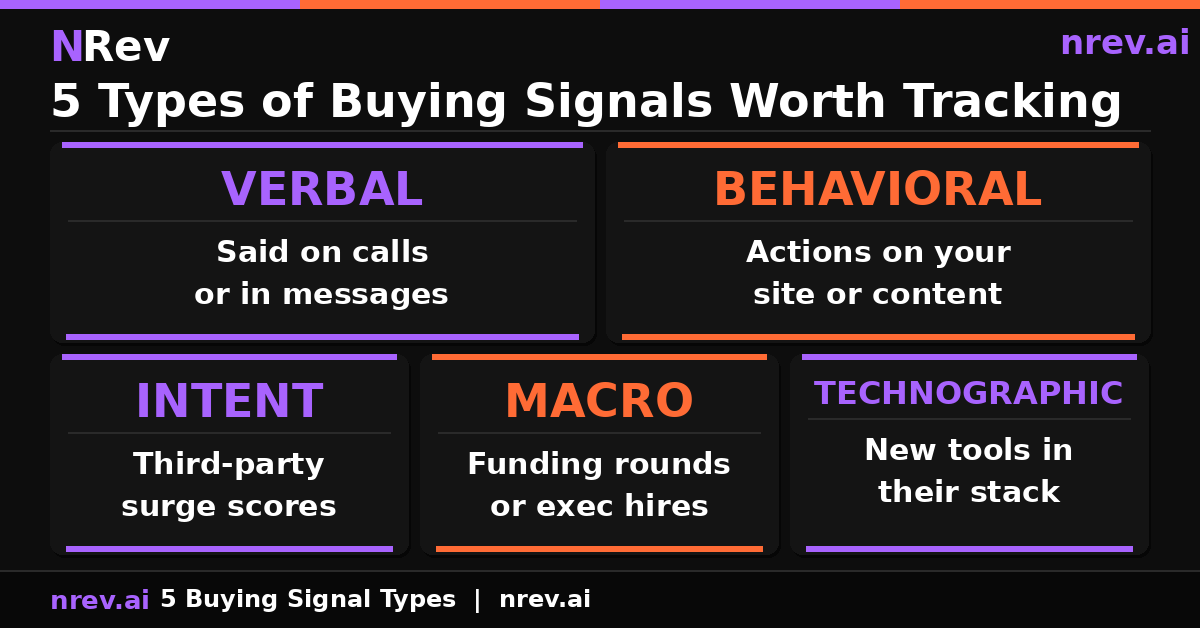
| Signal Type | Real-World Example | Where It Comes From | How Strong |
|---|---|---|---|
| Verbal | "We are budgeting for this next quarter." | Sales call recording | Very Strong |
| Behavioral | 3 pricing-page visits and 2 competitor downloads in one day | Your website | Very Strong |
| Intent Signals | 6sense showing a company is researching your category | 6sense, Bombora | Very Strong |
| Macro Change | A $20M+ funding round just announced | Crunchbase | Strong |
| Tech Stack Change | They just added a new tool that works alongside yours | HG Insights | Medium |
The most powerful move is to look for two or three signals hitting the same company at once. The best combination is a recent funding round plus a new VP of Sales hired in the last month. When both happen together, reach out within 48 hours.
You can track funding rounds and executive hires automatically using the Competitor Prospect Tracker playbook, which monitors your target accounts for exactly these events.
How to Find Buying Signals in Real Time
Most teams already have the data they need. The problem is it is spread across five different tools and nobody connects the dots. Here is where to look.
Your CRM
Look for deals that have gone quiet and suddenly get activity again. A lead that stopped opening emails and then clicks your pricing page is signaling something. Set up automated alerts for this. A clean CRM makes this much easier, which is why CRM data enrichment is worth doing before you build signal workflows.
Your Website
When a company visits your pricing page, that is a buying signal. Three times in one day is a very strong one. Tools that handle website visitor identification turn anonymous visits into named company records your reps can act on. A website visitor tracking workflow automates all of this routing so nothing gets missed.
Your Email Campaigns
When someone clicks a link in your pricing one-pager or competitive comparison email, they are showing you what they care about right now. That click is a behavioral buying signal. Use it to personalize your next message.
LinkedIn Sales Navigator
Job change alerts are free and underused. When a VP of Sales moves to a new company, they spend their first 90 days evaluating tools and have fresh budget. Being first in that conversation matters.
Intent Data Platforms
Tools like 6sense and Bombora track which companies are actively searching for products in your category across the entire web. A company surging on your category keywords is worth reaching out to even if they have never visited your site.
A Simple Routing Example
Here is a rule you can set up in Zapier today:
IF a company visits your pricing page more than twice AND has 200 to 1,000 employees THEN send the SDR a Slack alert with all the context they need.
The alert should look like this:
Hot Signal: Acme CorpWhat happened: 4 pricing page visits today plus 2 G2 reviews in 48 hoursHow well they fit: 87% match (500 employees, FinTech, uses Okta)Who owns this: @sdr-janeWhat to do: Call within 5 minutesWhat to say: "I noticed your team has been looking at our SSO solution."
For B2B lead scoring systems, signals like these are exactly what should push a lead from warm to hot automatically.
How to Respond When a Signal Fires
Two things decide whether a signal turns into a meeting: how fast you respond and how relevant your message is. Here is the framework by how recent the signal is.
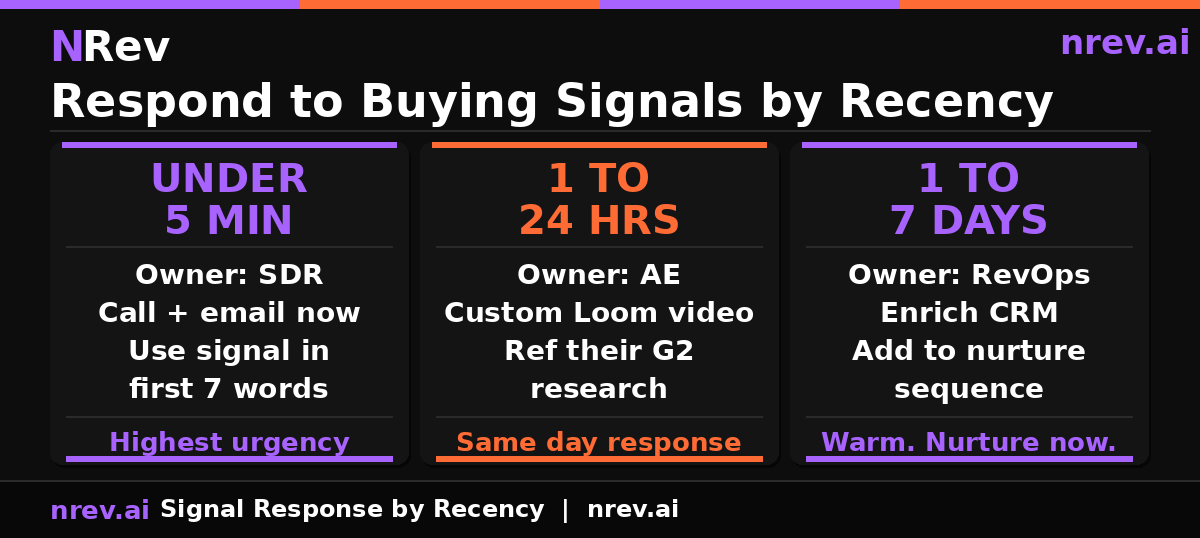
| How Recent | Who Responds | What to Do | How to Open |
|---|---|---|---|
| Under 5 minutes | SDR | Call plus email right now | "I saw you just downloaded our Buyer's Kit. What started the search?" |
| 1 to 24 hours | Account Executive | Short personal video (60 to 90 seconds) | Show the specific feature they were researching on G2 |
| 1 to 7 days | Operations | Move to the right nurture sequence | Invite to office hours or a live session |
For SDRs
Use the signal in your first sentence. "I noticed your team hit our pricing page three times today" beats any generic opener. This is the foundation of outbound automation that actually works because the message is specific to what the prospect did, not what you want them to do.
For Account Executives
When a new executive joins a target account, add them to the outreach. New leaders evaluate tools and build their own stack in the first 100 days. Your AI SDR can handle the initial reach so your AEs spend time on conversations that are already warm.
For Operations Teams
When a strong signal fires, pull that contact out of any slow nurture sequence and route them to direct sales immediately. The signal tells you they moved from "someday maybe" to "right now." This routing is a core part of GTM workflow automation where signals trigger the right action without anyone checking a dashboard manually.
Tools That Surface Buying Signals
| Tool | Best For | Live Alerts | Starting Price |
|---|---|---|---|
| 6sense | Spotting which companies are researching your category | Yes | $25K per year |
| ZoomInfo | Contact data plus company-level intent signals | Yes | $15K per year |
| Qualified | Identifying who is on your website right now | Yes | $3K per month |
| Common Room | Signals from communities and product activity | Yes | Free to $1K per month |
Before you spend big, start with the free layer. LinkedIn job alerts, Google Alerts on your target company names, and a basic visitor identification tool on your pricing page will surface a surprising number of signals before you need an enterprise intent platform.
You can see how these tools fit together in the revenue operations software comparison, which covers the full stack most GTM teams need at different stages.
How to Measure If It Is Working
Check These Every Week
These numbers tell you if the system is actually running:
- How many qualified signals your team spotted this week
- How quickly your SDRs are responding after a signal fires
- What percentage of signals are turning into booked meetings
Check These Every Month
These numbers tell you if it is making money:
- Your win rate on deals that started from a signal versus deals that did not
- How many fewer days it takes to close a deal when a signal was involved
- How much new revenue you can trace back to a signal-triggered conversation
If your signal-to-meeting rate is going up but your win rate is flat, the problem is in the sales conversation, not the signal system. If your response time is improving but you are still not booking meetings, the message is not specific enough to what the prospect actually did.
Strong SaaS demand generation programs use exactly these metrics to prove which channels are driving real pipeline, not just clicks and opens. And a solid RevOps foundation is what makes these metrics trackable in the first place.
Start Catching Buying Signals Before Your Competitors Do
Your prospects are dropping clues every single day. The question is whether your team has a system to catch them in time.
nRev AI builds and runs signal-based workflows automatically. You tell it what signals matter. It routes the right message to the right person at the right moment without anyone having to manually check a dashboard.
Start for free on nRev AI and build your first buying signal workflow today.
Frequently Asked Questions
What is the difference between a buying signal and a sales signal?

How do I avoid getting overwhelmed by too many intent signals?
Do buying signals work for product-led growth companies?