


Most LinkedIn connection requests get ignored. Not because the person is too busy, and not because your product is wrong. The reason is almost always the message itself.
A good LinkedIn connection message does one thing: it gives the recipient a real, specific reason to let you into their network. A bad one talks about your company, your offer, or your desire to "connect." Nobody accepts those.
This guide covers exactly what to write before someone accepts your connection request, what to say immediately after they do, and includes real examples you can adapt right now. Every example here is built around the approach that consistently gets the highest acceptance and reply rates in 2026.
What Is a LinkedIn Connection Message and Why It Matters
A LinkedIn connection message is the short note you attach to a connection request before sending it. It is the first real words the prospect reads from you, before they know anything about your product and before they have any reason to trust you.
Whether they accept or ignore your request usually comes down entirely to this message. A well-written note gives the recipient context, a reason to connect, and a signal that you actually looked at their profile. A generic note, or no note at all, gives them no reason to say yes.
The data makes this clear. According to research cited by Martal Group's LinkedIn outreach statistics page, which references data from LinkedIn Sales Navigator, LinkedIn outreach tied to a recent activity such as a promotion or event attendance boosts response rates by 32% compared to generic connection attempts. The original data source for this figure is LinkedIn's own Sales Navigator benchmarking data.
The average acceptance rate for personalized connection requests sits between 25 and 35%, according to response rate benchmarks published by LeadSpark AI which aggregates data across B2B LinkedIn outreach campaigns. Personalized connection requests achieve three times the acceptance rate of generic or blank requests.
Every percentage point in acceptance rate matters. A 30% rate on 100 weekly requests gives you 30 new first-degree connections, each of whom can then receive your follow-up message with a much higher chance of a reply.
The Rules Every LinkedIn Connection Message Must Follow
Before writing a single word, there are four rules that apply to every LinkedIn connection message regardless of who you are sending it to.
Rule 1: Stay under 200 characters for free accounts, 300 for Premium.
This is LinkedIn's hard limit. Free accounts get 200 characters including spaces and punctuation. LinkedIn Premium and Sales Navigator users get 300 characters. Free accounts are also limited to a small number of personalized notes per month, so every note needs to count. Keep your message tight, specific, and under the limit.
Rule 2: No pitch in the connection request.
The connection request is not the place to sell. The prospect does not know you yet. A pitch before trust has been established signals immediately that you are a cold stranger trying to sell something. It triggers the ignore response every time. Save the pitch for a later conversation.
Rule 3: Give one clear reason to connect.
Every message must answer the question: why are you reaching out to this specific person, right now? That reason should be something real, something you noticed about them specifically, not something you copied from a template.
Rule 4: End with something easy.
If your message ends with a question, make it the kind of question that requires zero commitment to answer. "Curious if you've seen similar patterns?" or "Worth connecting?" is easy. "Can we schedule a 30-minute call this week?" is too much, too soon.
Before They Accept: How to Write the Connection Request
The goal of the connection request message is not to start a sales conversation. The goal is simply to get accepted. Everything else comes after.
This distinction changes everything about how you write the message. You are not trying to impress them with your product or credentials. You are trying to show that you had a genuine, specific reason to reach out to this person today.
The most effective connection request messages in 2026 follow a simple structure.
Open with the trigger. What specific thing made you decide to reach out today? A job change, a post they published, a comment they left, a mutual connection, a funding announcement. One sentence. Specific and real.
State why it is relevant. One brief line explaining why that trigger made you think connecting would be worth their time. This is not a pitch. It is context.
Soft close. An easy open-ended phrase that does not require a commitment. "Would love to connect." "Thought it was worth reaching out." Simple and low pressure.
The entire message should fit within the character limit. That constraint is actually helpful. It forces you to cut everything that is not essential, which is usually the most persuasive version of any message.
The 4 Types of LinkedIn Connection Request Messages
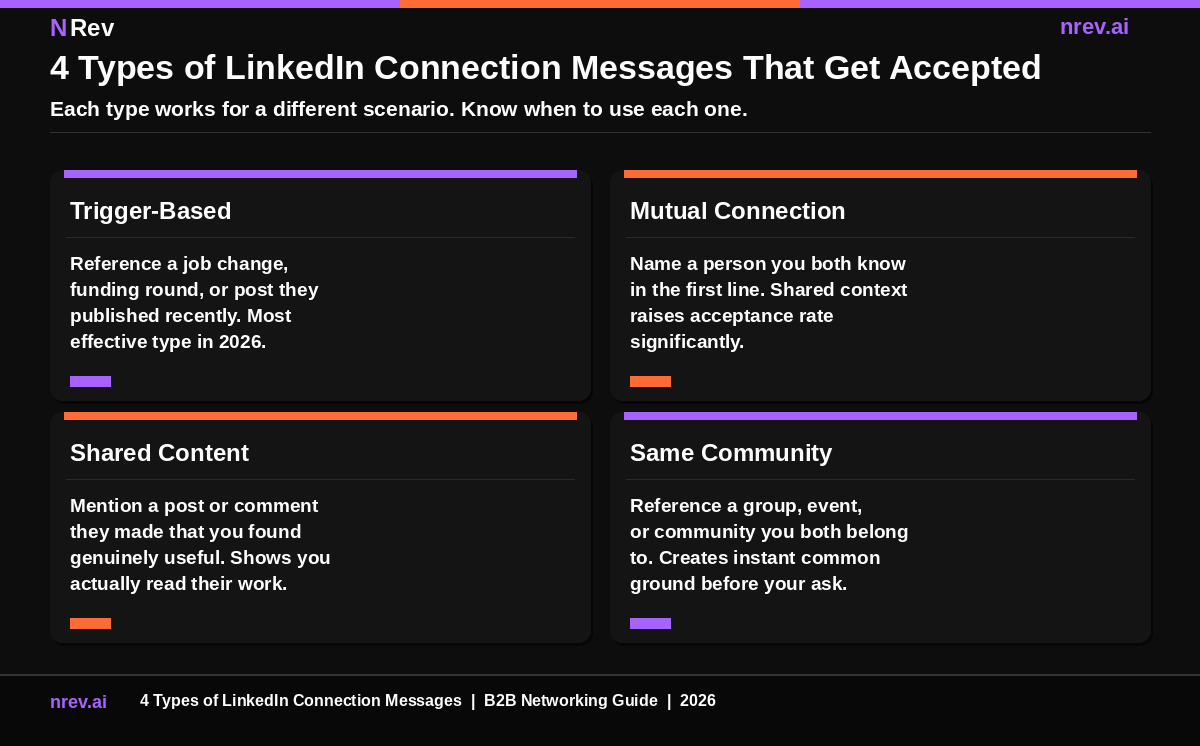
Not every connection request is the same situation. Here are the four message types that consistently produce the highest acceptance rates, and when to use each one.
Trigger-Based Messages. These reference a specific recent event involving the prospect: a job change, a funding announcement, a piece of content they published, or a comment they made. This is the highest-performing type in 2026 because it shows you noticed something real and timely. According to the Sales Navigator data cited by Martal Group (opens in new tab), outreach tied to recent activity boosts response rates by 32%.
Mutual Connection Messages. These open by naming a person you both know. Shared social context reduces the "stranger" feeling of a cold request and immediately raises credibility. The mutual connection does not need to be a close colleague. A shared community leader, a common LinkedIn group member, or a past conference speaker you both know all work.
Shared Content Messages. These reference something specific the prospect wrote or commented on. They work because they prove you actually read their work. The key is specificity: name the post, the insight, or the idea that genuinely caught your attention. Generic compliments like "Great post!" do not count.
Same Community Messages. These reference a LinkedIn group, industry event, professional community, or shared interest you both belong to. They create instant common ground without requiring you to know the person personally.
Eight LinkedIn Connection Message Examples That Work
Each example below is built around a specific trigger. Every one fits within 200 characters. None of them include a pitch.
If you would rather not start from a blank box, our free LinkedIn message generator drafts the first version from the prospect’s profile and you edit from there.
Example 1: Job change trigger "Hi Sarah, saw you just joined Acme as VP of Sales. Big move. Working on something relevant to that stage. Would love to connect."
Example 2: Funding round trigger "Hi Marcus, congrats on the Series B. The challenges at that stage are specific. Would love to connect and follow your journey."
Example 3: Shared content trigger "Hi James, your take on signal-based outreach last week was exactly what we have been testing. Would love to connect and compare notes."
Example 4: Mutual connection triggers "Hi Priya, both connected to Raj Kumar and noticed your work in RevOps. I would love to add you to my network."
Example 5: Same community trigger "Hi David, both members of the GTM Engineering group. Your questions there are sharp. Would love to connect."
Example 6: Competitor engagement trigger "Hi Emma, noticed you follow Competitor X closely. Working in that space too. Would love to connect."
Example 7: Event attendance trigger "Hi Tom, saw you attended the SaaStr event last week. Same session, different vantage point. Would love to connect."
Example 8: Content engagement trigger "Hi Lisa, you commented on the post about outbound automation that I thought was spot on. Would love to connect and continue that thread."
Notice what every example has in common. Each one opens with a specific, real observation. Each one gives a brief reason for reaching out. And none of them include a product name, a company pitch, or a calendar link.
After They Accept: What to Say in Your First Real Message
Most teams put all their effort into the connection request and then send a pitch the moment someone accepts. This is the single biggest mistake in LinkedIn networking.
The acceptance means the person allowed you into their network. It does not mean they are ready for a sales conversation. Sending a pitch in the first post-acceptance message is the fastest way to get the relationship off to a bad start.
Your first message after acceptance has one job: to open a conversation that feels natural and low-pressure.
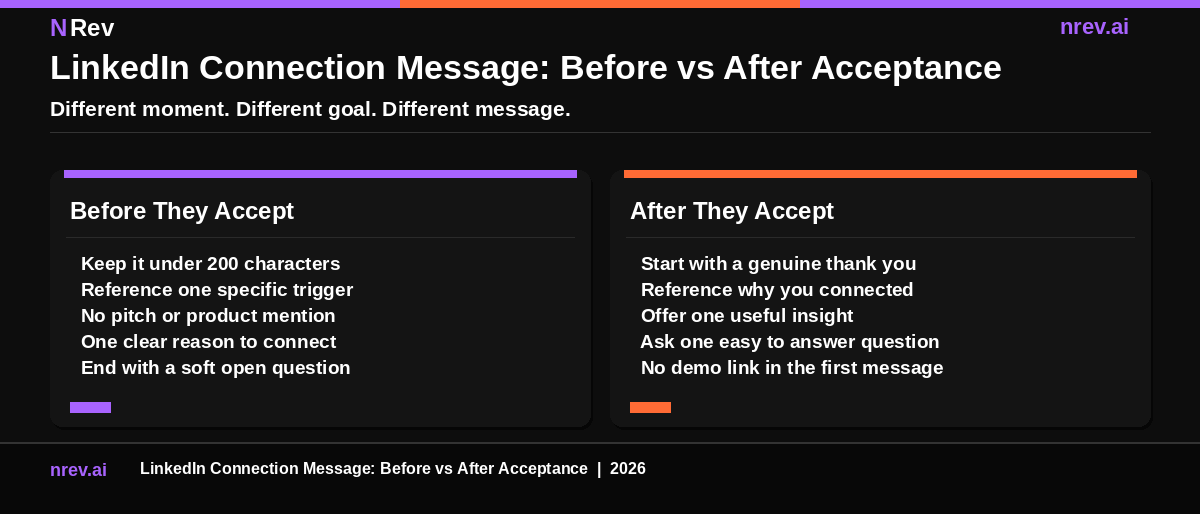
The best first post-acceptance message follows this structure.
Start by acknowledging the connection. A brief, genuine thank you for accepting. Not "Thanks for connecting, here is my calendar link." Just a warm, human acknowledgment of one or two sentences.
Reference the reason you connected. Go back to the trigger you mentioned in your connection request. This creates continuity and shows the conversation has a specific thread. "I mentioned your post last week" or "You just moved into the VP role I referenced" keeps the context alive.
Offer something useful without asking for anything. One specific insight, observation, or relevant piece of information that is genuinely useful to them. This does not need to be long. One or two sentences is enough. The goal is to demonstrate value before asking for anything.
Close with one easy question. The same principle as the connection request: make it simple to answer. Not a meeting request. Not a demo ask. Just a question that keeps the conversation going naturally.
Five LinkedIn Post-Acceptance Message Examples
Example 1: After a job change connection "Thanks for connecting, Sarah. Congrats again on the VP role. We worked with a few sales leaders going into enterprise at the same stage. One pattern we saw was [specific insight]. Curious if that maps to what you are navigating?"
Example 2: After a funding round connection "Thanks for connecting, Marcus. Series B is such a specific moment. The decisions made in the first 90 days usually determine the next 18 months. One thing we see repeatedly: [relevant observation]. Does that match what you are seeing?"
Example 3: After shared content "Great to be connected, James. Your point about signal quality over volume was exactly right. We found the same thing when testing across [relevant context]. Happy to share what worked if useful."
Example 4: After a mutual connection "Thanks for accepting, Priya. Raj mentioned your team had been rebuilding the RevOps stack. We just published a short breakdown of what teams at that stage usually get wrong first. Worth sending over?"
Example 5: After the same community "Good to be connected, David. Your GTM Engineering questions in the group are always the most specific ones. We have been testing a few of the same things. Happy to compare notes if it would be useful."
Every example here delivers value first. None of them ask for a meeting. None of them include a product link. Each one references the specific context from the original connection request.
What to Avoid in Any LinkedIn Connection Message
These are the patterns that consistently destroy acceptance and reply rates. Each one is recognizable from a mile away.
Opening with your company name. "Hi, I work at Company X and we help teams like yours..." This tells the recipient you wrote this for a thousand people, not for them. Nobody accepts a message that is obviously a template.
Asking for a meeting in the connection request. The connection request is the first 30 seconds of a professional introduction. Asking for 30 minutes of someone's time before they know who you are is the equivalent of asking someone to marry you on the first handshake.
Generic compliments. "I came across your profile and was really impressed." This phrase has been sent to hundreds of millions of people. It communicates nothing real and signals immediately that it is mass outreach.
Including a link in the connection request. LinkedIn's algorithm treats links in connection notes as a spam signal. Many recipients see them the same way. Never include a URL in the connection request itself.
Sending a pitch immediately after acceptance. This is the most common post-acceptance mistake. The moment someone accepts, their inbox should receive a genuine continuation of the conversation, not a product brochure.
Using "I" as the first word. A message that opens with "I noticed..." or "I wanted to reach out..." puts you at the center of a message that should be about them. Start with their name or with the thing you noticed about them.
How Signal-Based Targeting Changes Everything
The examples throughout this guide all share one thing: they are built around a specific, real signal that the prospect generated. A job change. A post. A funding announcement. A comment.
This is the core difference between connection messages that get accepted and messages that get ignored. Generic messages treat prospects as names on a list. Signal-based messages treat them as real people who just did something specific that made them worth reaching out to right now.
Finding those signals manually takes hours every day. Monitoring a list of target accounts across job changes, funding events, content activity, and competitor engagement is not something any human can do consistently at scale without a system behind it.
This is exactly where signal-based outbound workflows change the economics. Instead of manually hunting for triggers, the system surfaces them automatically. Your team knows the moment a target account shows buying intent, and the connection message becomes the first touch in a warm sequence rather than a cold approach.
When you combine a well-written connection message with a LinkedIn lead generation system that surfaces the right people at the right time, your acceptance rate, your reply rate, and your meeting conversion all improve together.
The goal is not to send more messages. The goal is to send the right message to the right person at the exact moment when it will land.
Turn LinkedIn Connections Into Booked Meetings With nRev AI
Every buying signal happening right now in your target accounts is a reason to reach out. A new VP of Sales. A recent Series A.
A competitor follow. Most GTM teams miss every one of these moments because they are not watching.
nRev AI monitors your target accounts around the clock, surfaces the right prospects the moment they show intent, and gives your team the context to write a connection message that actually gets accepted.
You describe what you want the system to watch for. nRev builds the workflow. No engineering. No manual monitoring. Just the right name, at the right time, with the right reason to reach out.
Build your first signal-based LinkedIn workflow on nRev AI and start every connection with a reason.
Frequently Asked Questions
What should I write in a LinkedIn connection message?

Keep it short, specific, and personal. The best LinkedIn connection message opens with one real observation about the recipient, such as a recent job change, a post they published, or a mutual connection you share. Follow with one brief line explaining why connecting makes sense for both of you. Close with a soft phrase that does not require commitment, like "Would love to connect."
Free accounts are limited to 200 characters, so every word needs to count. Never include a product pitch or a calendar link in the connection request itself.
What is the best LinkedIn connection request message?
The best LinkedIn connection request message is a trigger-based message that references something specific the recipient just did or experienced. For example, referencing a recent job change, a funding announcement, or a piece of content they published shows you actually looked at their profile and had a genuine reason to reach out.
According to data from LinkedIn Sales Navigator benchmarks cited by Martal Group (opens in new tab), outreach tied to recent activity boosts response rates by 32% compared to generic messages. A personalized trigger-based message within 200 characters, with no pitch and no link, is consistently the highest-performing format.
What do you say after someone accepts your LinkedIn connection?
After someone accepts your LinkedIn connection request, your first message should continue the thread from your connection request naturally. Thank them briefly for connecting, reference the specific reason you reached out originally, offer one genuinely useful insight or observation, and close with one easy question that requires no commitment to answer.
Do not send a pitch, a calendar link, or a product description in the first post-acceptance message. The acceptance means they allowed you into their network. The conversation that follows determines whether that turns into anything real.