

You post on LinkedIn. You get some likes. Maybe a comment or two. But you are not sure why some posts travel far and others disappear the moment you hit publish.
Most people on LinkedIn are optimizing for the wrong things. They chase likes, copy trends, and wonder why their reach keeps shrinking. In 2026, LinkedIn's algorithm has fundamentally changed what it rewards.
This guide explains what LinkedIn engagement actually is, how the algorithm scores it, what a good engagement rate looks like for your account size, and the six most effective things you can do right now to increase it. Every stat in this guide is traced to its original published source.
What Is LinkedIn Engagement
LinkedIn engagement is the total set of actions members take on your content. This includes reactions (likes, celebrate, insightful), comments, reposts, and clicks.
Engagement is not the same as impressions. Impressions count how many times your content appeared on a screen. Engagement counts how many people actually did something after seeing it. A post can have thousands of impressions and almost zero engagement if the content does not connect with the audience.
For B2B teams, LinkedIn engagement matters because it is the first signal that your content is building trust with potential buyers. Someone who comments on your post three times before you ever send them a message is already warm. They know your thinking, they have seen your perspective, and they are far more likely to reply to an outreach message than someone who has never encountered your content.
Engagement on LinkedIn is also the primary input the algorithm uses to decide how widely to distribute your content. Without engagement, your posts reach almost no one outside your direct network. With strong engagement, the same post can reach thousands of people who do not follow you yet.
How LinkedIn Measures Engagement
LinkedIn calculates your engagement rate using a straightforward formula. According to LinkedIn's own Content Analytics documentation (opens in new tab):
Engagement rate = (Clicks + Reactions + Comments + Reposts + Follows) divided by Impressions, multiplied by 100
This means engagement rate is calculated against impressions, not follower count. That distinction matters. A post seen by 1,000 people that earns 50 engagements has a 5% engagement rate. The same 50 engagements on a post seen by 10,000 people gives a 0.5% rate.
Most third-party guides calculate engagement rate based on followers, which gives you a number that is easy to collect but not the same calculation LinkedIn itself uses. For accurate benchmarking, always calculate against impressions.
Not all engagements carry equal weight in the algorithm. Comments carry significantly more algorithmic weight than reactions. A post with 5 thoughtful comments will consistently outperform a post with 50 likes in terms of reach and distribution. Saves and shares carry the most weight of all because they signal that content is worth keeping or worth sending to someone else.
What Is a Good LinkedIn Engagement Rate in 2026
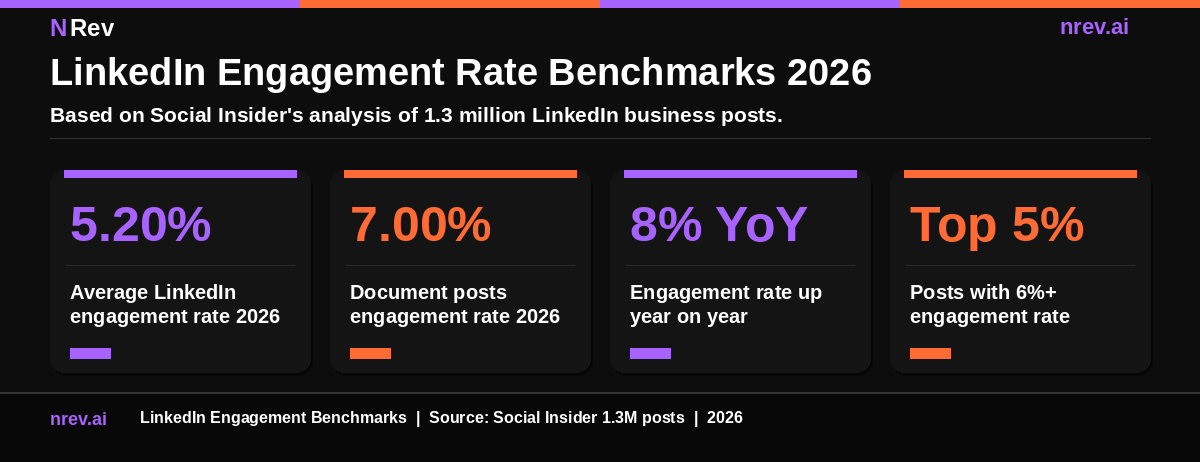
The benchmark data below comes from Social Insider's 2026 LinkedIn Benchmarks Report, which is based on the analysis of 1.3 million LinkedIn business posts. This is the root source used by most industry publications when citing LinkedIn engagement benchmarks.
Overall platform average: 5.20% engagement rate
This represents an 8% year-on-year increase, which means the platform is getting more competitive but also more rewarding for content that earns real engagement.
By content format:
- Document posts (carousels): 7.00% average engagement rate (14% year-on-year increase)
- Image posts: up 9% year-on-year
- Video posts: up 7% year-on-year
- Text-only posts: up 12% year-on-year but still the lowest absolute rate
By account size:
- Pages under 1,000 followers: 4 to 8% is achievable because smaller audiences are more personal and more likely to engage
- Pages with 1,000 to 50,000 followers: 2 to 4% is healthy
- Pages above 50,000 followers: 1 to 3% is typical because the audience is broader and less personally connected to the author
What counts as excellent: Consistently hitting 6% or above puts you in the top 5% of LinkedIn content creators on the platform.
The number to watch alongside your engagement rate is the gap between your impressions and your reach. A large gap means the algorithm is showing your content repeatedly to the same people rather than distributing it to new audiences. That is a signal your content is not generating enough early engagement to earn wider distribution.
How the LinkedIn Algorithm Scores Engagement in 2026
Understanding how the algorithm works is the fastest path to improving your engagement. LinkedIn's algorithm in 2026 has shifted from rewarding the quantity of interactions to rewarding the depth of interactions.
The primary metric driving distribution is now what researchers and LinkedIn analysts refer to as the Depth Score. LinkedIn's engineering team confirmed their use of dwell time as a ranking signal in their official engineering blog post on feed ranking (opens in new tab). The Depth Score is a composite of several signals that measure how meaningfully someone engaged with your content.
Dwell time is the primary signal. The longer someone pauses on your post before scrolling away, the higher your Depth Score rises. A post someone reads for 45 seconds contributes far more to your distribution than a post someone scrolls past after a quick like.
Comment quality and thread depth are the second most important signals. A comment that generates two or three replies carries far more weight than a comment that receives no response. When you respond to comments and create a thread, the algorithm reads that as evidence of a genuine conversation happening around your content.
Saves are the highest-quality engagement signal. When someone saves your post, it tells the algorithm that your content has lasting reference value, not just momentary interest. Educational content, frameworks, and checklists consistently earn more saves than news-style or opinion posts.
Three things that hurt your reach in 2026:
- External links in the post body reduce reach by approximately 60% because the algorithm penalizes content that tries to move users off LinkedIn.
- Engagement bait tactics like "comment YES if you agree" are actively detected and suppressed.
- Generic AI-generated content with predictable phrasing patterns is flagged by LinkedIn's quality classifier and given reduced distribution.
The algorithm also runs a quality check in the first 30 to 60 minutes after you publish. LinkedIn shows your post to a small test group, typically 2 to 5 percent of your network, and measures how that group responds. Strong early engagement leads to broader distribution. Weak early engagement limits the post to that small initial group.
The Best Content Formats for LinkedIn Engagement
Format choice is one of the fastest ways to increase engagement because different formats generate different amounts of dwell time by design.
Document carousels are the top performing format in 2026 according to Social Insider's benchmark data. A well-structured carousel keeps readers swiping through multiple slides, which generates significant dwell time with each swipe. The educational, framework-style carousel consistently achieves 7% or higher engagement rates across most industries.
Text-only posts still work well when the writing is strong. LinkedIn's algorithm rewards text posts that hold attention because good writing generates more dwell time than a weak image. The key is a strong hook in the first two lines and a clear payoff for the reader who clicks "see more."
Images perform well when they visualize something that would take longer to read as text. A stat card, a comparison table, or an original graphic can stop the scroll and generate quick engagement. Posts with images generate roughly two times more engagement than posts without, according to LinkedIn's own published data.
Native video is growing fast in 2026 but requires different optimization. Videos should be 30 to 90 seconds, captioned for silent viewing, and should deliver the core value in the first five seconds. Video views on the platform have grown 36% year-on-year, according to the Social Insider 2026 report.
Polls generate the highest impression rates for larger pages because they require zero effort to engage with. The tradeoff is that a poll click carries very low algorithmic weight compared to a comment or save.
How to Increase Your LinkedIn Engagement
These are the six changes that consistently move the engagement rate number. Each one targets a specific signal in the algorithm.
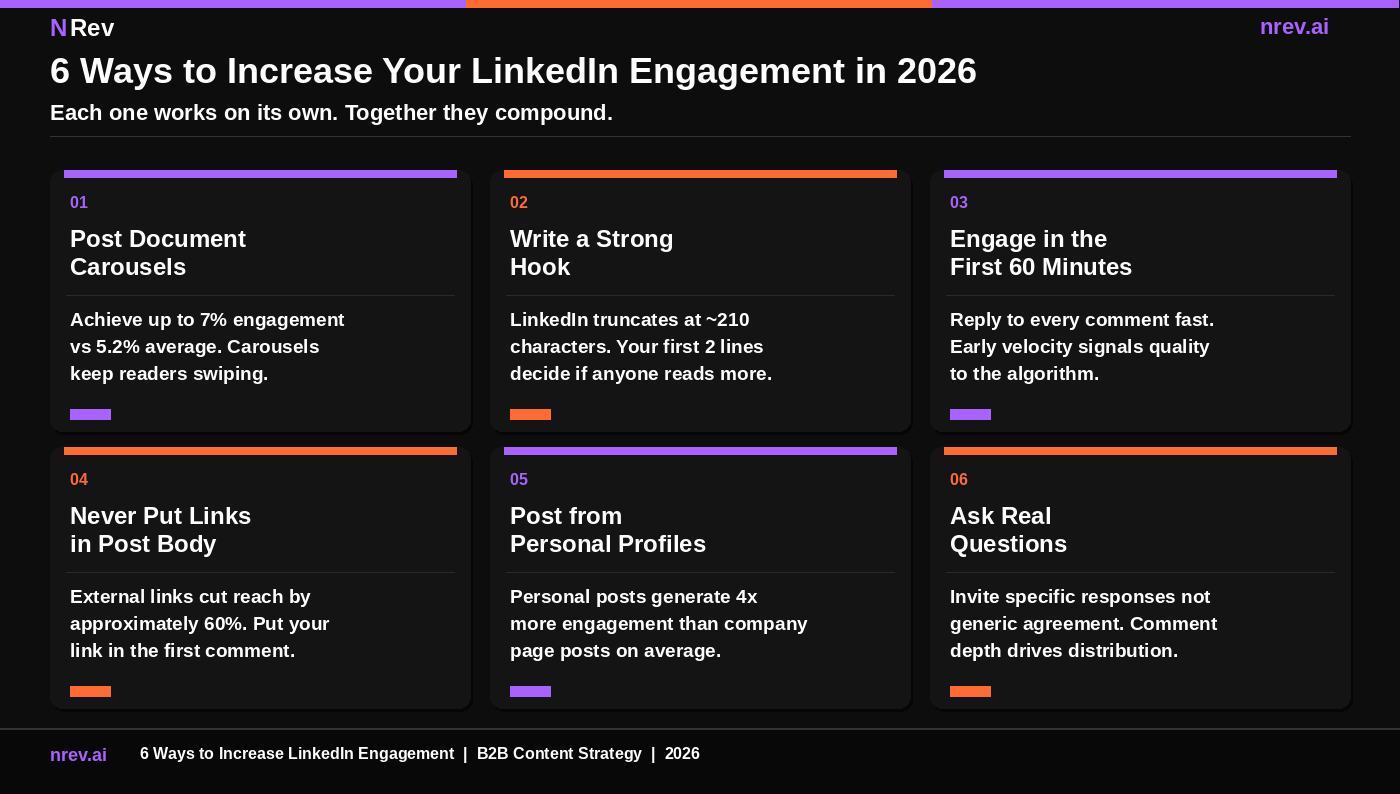
01. Post document carousels. Document posts achieve a 7% average engagement rate compared to the 5.2% platform average, according to the Social Insider 2026 data. The format works because it requires active participation, each swipe is a micro-engagement that increases dwell time and signals quality to the algorithm. Create frameworks, checklists, or step-by-step guides in carousel format and share them as PDF uploads directly to LinkedIn.
02. Write a hook that earns the "see more" click. LinkedIn truncates your post at approximately 210 characters before showing the "see more" button. Every additional word after that point is invisible until the reader decides to click. Your first two lines must create enough curiosity, tension, or specific value that the reader has no choice but to expand the post. That click itself registers as a positive dwell time signal in the algorithm.
03. Engage with every comment in the first 60 minutes. The algorithm uses the first 60 to 90 minutes after publishing to decide whether to distribute your post to a wider audience. Every comment you respond to during this window starts a thread and keeps the engagement velocity high. Even a short, thoughtful reply matters. Set aside 15 minutes after publishing to stay in the comments.
04. Never put links in your post body. External links in the post body reduce your reach by approximately 60% because LinkedIn's algorithm prioritizes keeping users on the platform. If you need to share a link, put it in the first comment after publishing. This approach preserves your organic reach while still making the link accessible to people who want it.
05. Post from personal profiles, not just your company page. Personal profiles generate approximately four times more engagement than company page posts on LinkedIn. People engage with people. If your team has active LinkedIn users, encourage them to share original content and perspectives from their personal accounts rather than resharing company page posts.
06. Ask real questions, not engagement bait. Ending your post with a specific, genuine question invites substantive replies that generate comment depth and thread length, both strong algorithmic signals. The question needs to be genuinely interesting and specific. "What do you think?" earns nothing. "What is the biggest bottleneck you see in your outbound workflow right now?" earns thoughtful responses that the algorithm treats as evidence of valuable content.
How LinkedIn Engagement Connects to B2B Pipeline
LinkedIn engagement is not just a content metric. For B2B teams, it is the top of a pipeline funnel that runs from content visibility all the way to booked meetings.
To make that concrete, you can pull post engagers and check which of them match your ICP.
Every impression your content earns is a potential buyer seeing your name and your thinking. Every engagement is a signal that they found it worth their time. And every person who engages with your content three or more times before you reach out to them is a warm prospect who already has context on who you are and what you do.
This is the compounding advantage of a consistent LinkedIn engagement strategy. Teams that post regularly and earn consistent engagement are building a warm audience of potential buyers. When they run LinkedIn outreach campaigns against that audience, their reply rates are significantly higher than teams running cold outreach to lists with no prior engagement.
The connection point is signal-based outreach. When someone engages with your LinkedIn content repeatedly, that is a buying signal. They are spending time on your content because it is relevant to their situation. Reaching out to someone who has engaged with your posts three times in the past two weeks will almost always convert at a higher rate than a cold connection request to someone who has never seen your name.
For teams building this system, connecting your LinkedIn content analytics to your outbound automation workflow closes the loop between engagement and pipeline.
How to Track Your LinkedIn Engagement
LinkedIn provides native analytics for both personal profiles and company pages. Here is where to find each one.
For a single post: Click the analytics icon below any post you have published. LinkedIn shows you total impressions, engagement rate, reactions, comments, reposts, and clicks. This is the most granular view of individual post performance.
For your personal profile overall: Go to your profile and click "Analytics." LinkedIn shows you post impressions, profile views, and search appearances over the past 7, 30, or 90 days. You can see which posts performed best and filter by content type.
For a company page: Click "Analytics" in the top navigation of your page, then select "Content." This shows engagement rate, impressions, reactions, comments, and reposts for every post, with the ability to filter by time range and content type.
The two numbers to review weekly are your engagement rate per post and your comment-to-impression ratio. If your engagement rate is consistently below 2%, your hook quality or content relevance needs attention. If your comment-to-impression ratio is very low relative to your reaction count, your content is getting passive acknowledgment but not sparking genuine conversations.
How nRev AI Automates the Hard Parts
The most time-consuming parts of LinkedIn outreach are the parts that happen before you ever send a message: monitoring target accounts for buying signals, researching prospects, and building personalized message drafts at scale.
This is exactly what nRev AI is built for. nRev is an Agent OS for GTM teams. It monitors your target accounts for buying signals in real time, surfaces the right prospects at the right moment, and generates personalized outreach drafts based on the signal it detected.
Your team focuses on the conversations. The system handles the detection, the research, and the timing.
You describe the LinkedIn outreach workflow you want in plain language. nRev's AI builds it. No engineering. No automation setup. Just a workflow that works.
Turn LinkedIn Signals Into Booked Meetings With nRev AI
Your best prospects are showing buying signals on LinkedIn right now. A job change here. A funding round there. A competitor follow that tells you someone is actively evaluating solutions in your category. Most teams miss every single one because they are not watching.
nRev AI monitors your target accounts automatically, surfaces the right prospects at the right moment, and helps your team reach out with the right message before anyone else does. You describe the workflow you want in plain language. nRev builds it. No engineering. No manual tracking. Just a system that puts the right name in front of your team at exactly the right time.
Build your first LinkedIn outreach workflow on nRev AI and turn signals into booked meetings.
Frequently Asked Questions
What is LinkedIn engagement?

What is a good LinkedIn engagement rate?
How do I increase my LinkedIn engagement?