

CRM Data Cleansing: How to Fix Dirty CRM Data and Keep It Clean Automatically
A CRM full of dirty data does not just slow your team down. It actively costs you deals. Reps call numbers that are disconnected. Sequences go to contacts who left the company months ago. Pipeline reports include duplicate opportunities that make the forecast look stronger than it is. CRM data cleansing is the process that fixes all of this, and when set up correctly, it keeps your database clean automatically rather than requiring a manual cleanup every few months.
Most teams treat CRM data cleansing as a project: something you do once after a migration or before a big campaign push. That thinking is exactly why the same problems keep coming back. CRM hygiene is not a project. It is a system. This guide covers what CRM data cleansing involves, a six-step process to clean your database right now, and the specific tools and workflows that keep it clean without ongoing manual effort.

What Is CRM Data Cleansing and Why It Is Different from CRM Hygiene
CRM data cleansing is the reactive process of finding and fixing problems that already exist in your database. It includes removing duplicate records, correcting outdated contact information, filling in missing fields, standardizing formatting inconsistencies, and archiving contacts who are no longer reachable or relevant.
CRM data hygiene is the proactive counterpart. It is the set of policies, validation rules, automation workflows, and entry controls that prevent bad data from entering the system in the first place. Hygiene stops the problem from forming. Cleansing fixes it after it has already formed.
Both are necessary. Cleansing without hygiene produces a clean database that gets dirty again within 90 days as new records enter without controls and existing records decay without monitoring. Hygiene without cleansing leaves all the existing dirty data in place while preventing only new problems from being added.
The full CRM data quality system requires both: a proper cleansing project that brings the existing database to a known clean state, followed by ongoing hygiene practices that maintain that state automatically. This guide covers both in the sequence that actually works.
What Dirty CRM Data Actually Costs Your Business
The business case for CRM data cleansing is documented in detail by Validity's primary research. According to Validity's State of CRM Data Management in 2025 report, which surveyed 602 CRM users and administrators across the US, UK, and Australia, three numbers define the scale of the problem.
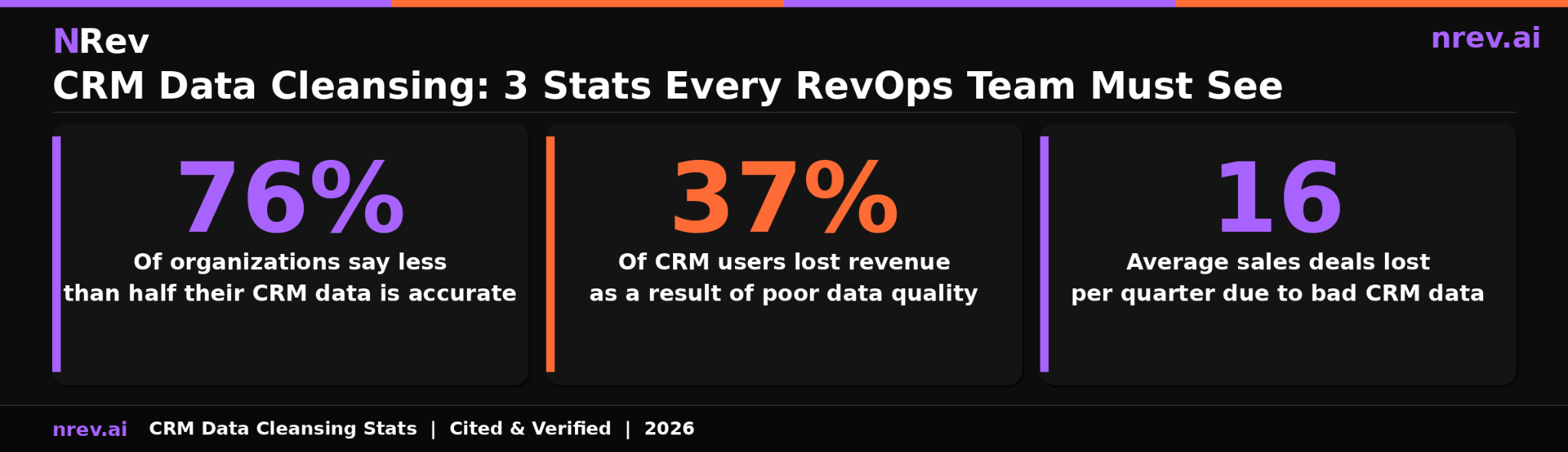
Seventy-six percent of organizations say less than half of their CRM data is accurate and complete. Thirty-seven percent of CRM users reported losing revenue as a direct consequence of poor data quality. Companies lose an average of 16 sales deals per quarter as a result of bad CRM data.
These numbers translate into specific costs for your team. Sixteen lost deals per quarter is not an abstract statistic. It is approximately one deal lost every week to bad data: a rep who wasted time pursuing a contact who is no longer at the company, a sequence that bounced before it reached anyone, or a routing error that sent a high-value inbound lead to the wrong territory.
The cost compounds when bad data feeds into automated workflows. When your CRM data is wrong, every system connected to it produces wrong outputs. Your lead scoring model scores based on incorrect firmographic data. Your personalization tokens populate with outdated company names or old job titles. Your segmentation sends the wrong message to the wrong audience. A single bad record in the CRM does not just waste one outreach. It corrupts every downstream action taken on that record.
The Six Types of Dirty Data Hiding in Your CRM
Before cleansing a database, you need to know exactly what you are looking for. Dirty CRM data comes in six distinct forms, and each requires a different remediation approach.
Duplicate records are the most visible and most damaging type. The same contact, company, or opportunity exists under multiple records, often with different information stored in each version. Duplicates are typically created when the same person enters the CRM through multiple channels: a form fill, a list import, and a manual entry by a rep all create separate records without any deduplication logic to catch them. Each duplicate inflates your pipeline count and splits your engagement history across records, making it impossible to see the full relationship in a single view.
Outdated contact data is the result of natural data decay. Contacts change jobs, get promoted, move to new companies, and update their email and phone information at a consistent rate. Research cited across multiple industry sources shows B2B contact data decays at approximately 22 to 25 percent annually. A contact record that was accurate at the start of the year may have an invalid email and a wrong job title by Q4 without any update ever being made in the CRM.
Incomplete records are contacts and accounts with missing critical fields: no email address, no phone number, no company size, no job title. Incomplete records cannot be routed correctly, scored accurately, or included in targeted segmentation. They pass through your workflows silently, consuming capacity without contributing to the pipeline.
Format inconsistencies are subtle but damaging to automation. The same country stored as "USA," "US," "United States," and "U.S.A." across different records breaks segmentation filters. Phone numbers stored in different formats across records make deduplication harder and dialers unreliable. Company names entered as "Acme Corp," "Acme Corporation," and "Acme Corp." cause account matching to fail.
Orphaned records are contacts that are no longer associated with an active account, leads that were never converted or formally disqualified, and opportunities that have been inactive for months without being closed-lost. These records clutter pipeline reports, inflate contact counts, and consume the attention of automated workflows without any chance of converting to revenue.
Fabricated data is the least discussed but surprisingly common. When CRM fields are required and reps are in a hurry, they fill in placeholder data: fake phone numbers, personal email addresses instead of work ones, or generic company names. Research cited by Prospeo's CRM data quality analysis indicates that 37 percent of staff admit to entering inaccurate CRM data to satisfy required fields. The result is a database that looks complete but contains a meaningful percentage of records that are deliberately wrong.
The 6-Step CRM Data Cleansing Process
CRM database cleansing is most effective when it follows a structured sequence. Running these steps out of order produces incomplete results because later steps depend on the output of earlier ones.

Step 1: Audit and Profile
Before changing anything, measure the current state of your database. Run a data profiling report that answers: what percentage of records have a valid email? What is your current duplicate rate? What percentage of contacts are missing a job title or company? How many records have had no activity or update in the past 90 days?
This audit establishes your baseline and tells you which problem type is most severe. A database with a 25 percent duplicate rate needs a different starting point than one with a 40 percent email invalid rate. Without profiling first, you are cleaning without knowing what you are cleaning.
Step 2: Standardize Formats
Before deduplicating, standardize the fields that your matching algorithm will use to find duplicates. Normalize company names by removing inconsistent legal suffixes. Set phone numbers to a single format. Standardize country and state fields to a consistent lookup list. Convert job titles to a controlled vocabulary where possible.
Standardizing before deduplicating significantly improves match accuracy because fuzzy matching algorithms perform better when the input data is consistent. Two records representing the same company will score higher similarity after standardization than before it.
Step 3: Remove Duplicates
With standardized data, run a full deduplication pass across your contact, account, and opportunity records. Configure your matching rules to catch both exact matches on unique fields like email and fuzzy matches on name and company combinations. Review borderline matches before merging and apply survivorship rules that preserve the most complete and most recently verified value from each field rather than defaulting to the most recent record.
For Salesforce teams, DemandTools and Cloudingo are the most established native deduplication tools. For HubSpot teams, the native duplicate management feature handles standard cases, with Dedupely or Insycle for more complex scenarios.
Step 4: Verify and Enrich Contacts
After deduplication, run a bulk email verification pass on all active contact records. Invalid and undeliverable addresses should be suppressed from active sequences and flagged for removal or manual review. Run enrichment on records with missing critical fields to fill in job titles, direct phone numbers, and company firmographic data from verified external sources.
This step connects directly to the lead enrichment tools your team uses for ongoing enrichment. The cleansing project establishes the clean baseline. The enrichment tool maintains it continuously afterward.
Step 5: Archive Stale Records
Flag every contact that has had no meaningful engagement, no update, and no valid outreach in the past 90 to 180 days depending on your sales cycle length. Do not delete these records: archive them. Moving stale records to an archived status removes them from active pipeline views and automation workflows while preserving the historical data for reference and future reactivation campaigns.
This step alone can reduce your active contact count significantly and improve the accuracy of every metric your team tracks, from engagement rates to pipeline coverage ratio.
Step 6: Lock Entry Points
The final step in CRM database cleansing is implementing the validation rules and formatting requirements that prevent new dirty data from entering. Configure required fields with a specific format. Add validation rules that reject incorrectly formatted email addresses and phone numbers at the point of entry. Set up duplicate prevention rules that check new records against existing ones before they are created. Implement picklist fields wherever free-text fields currently allow inconsistent input.
This is the step where a cleansing project becomes a CRM hygiene system. Without it, the database returns to its pre-cleansing state within a few months.
How to Keep Your CRM Database Clean Automatically
CRM data hygiene that relies on manual effort is hygiene that will eventually stop happening. The teams that maintain clean CRMs permanently are the ones that have automated the most repetitive hygiene tasks.
Clean data is only worth the effort if you use it, which is why the next step is to turn CRM records into buying signals your reps can act on.
Automated duplicate prevention on creation. Configure your CRM's duplicate rules to check new records against existing ones the moment they are created, regardless of what channel they came from. A new form fill, a list import, and a manual entry should all pass through the same duplicate check before a new record is created.
Continuous email verification. Connect your CRM to an email verification service that runs in the background, flagging contacts whose email addresses have become invalid since their last successful outreach. Many CRM data cleansing services offer this as a continuous background check rather than a one-time batch process. Contacts flagged as undeliverable are automatically suppressed from active sequences before they damage your sender domain reputation.
Automated decay detection. Build CRM workflows that flag records when they meet stale criteria: no activity update in 60 days, email bounced in the last send, contact's tenure at their current company suggesting they may have moved on. These flags surface records for review before the decay compounds.
Real-time enrichment on new record creation. Connect your enrichment tool to trigger automatically when a new contact or account is created. The moment a lead enters the CRM, enrichment fills in missing fields from verified external sources without requiring a rep to manually research and update each record.
Quarterly deep clean audit. Even with automation handling the continuous layer, schedule a quarterly manual review that checks your duplicate rate, email validity rate, field completion rate, and stale record count against your target benchmarks. Automation catches most issues. A quarterly review catches the ones automation misses.
Best Tools for CRM Data Cleansing and Ongoing Hygiene
The right tool depends on your CRM platform, the scale of your database, and whether you need a one-time cleansing solution or ongoing hygiene automation.
For Salesforce teams:
DemandTools is the most established native Salesforce data quality platform. It handles deduplication, mass data updates, field standardization, and CRM data cleansing services within the Salesforce environment without requiring data exports. Best for mid-market to enterprise Salesforce teams that need a comprehensive data quality suite.
Cloudingo provides Salesforce deduplication with an undo merge feature, making it the safer choice for teams that want the ability to reverse batch merges that produce unintended results. Strong for teams new to automated merging.
Insycle offers a visual CRM data management interface that works with both Salesforce and HubSpot. It is particularly strong for formatting standardization, bulk field updates, and building recurring cleansing workflows that run on a schedule. Best for RevOps teams that want visibility into every change made to the database.
For HubSpot teams:
HubSpot's native duplicate management tool handles standard deduplication for contacts and companies. For more complex scenarios involving large databases or cross-object deduplication, Dedupely provides more configurable matching logic.
Clearout specializes in email verification and validation, integrating directly with HubSpot to flag and suppress invalid email addresses in real time. Best used as a continuous hygiene layer rather than a one-time cleansing tool.
For multi-platform teams:
Integrate.io is an ETL platform that handles data standardization and cleansing across multiple systems simultaneously. Best for teams with data flowing into the CRM from multiple integration points that all need consistent formatting and validation rules applied.
CRM Data Cleansing Services: When to Outsource vs Build In-House
CRM data cleansing services are third-party providers that run the cleansing process for you, either as a one-time project or as an ongoing managed service. They are worth considering when your team lacks the RevOps bandwidth to run a proper cleansing project internally, when your database has accumulated years of problems that would take months to address manually, or when the scale of the cleanup exceeds what your existing tools can handle efficiently.
The tradeoff with outsourced CRM data cleansing services is control and continuity. A service provider can clean your database comprehensively, but they cannot enforce the behavioral changes inside your team that prevent the problems from returning. If you outsource the cleansing without building the internal hygiene system, you will need another cleansing service in 12 to 18 months.
The most effective approach for most B2B teams combines both: use a cleansing service for the initial heavy-lift project to bring the database to a clean baseline, then build the in-house automation and governance system that maintains it permanently.
If your team is starting from a database that has never been professionally cleaned, an outsourced cleansing project combined with a proper hygiene system implementation will produce better results than attempting to build both simultaneously in-house without dedicated data engineering resources.
How nRev AI Connects Clean CRM Data to Outbound That Converts
Every outbound action nRev AI builds is only as effective as the data it runs on. When nRev identifies a high-intent signal on a target account, it cross-references that signal against your CRM to find the right contact, pull the account relationship history, and determine whether this is a new opportunity or a re-engagement of an existing account.
When the CRM is dirty, this cross-reference produces noise: duplicate accounts that obscure the true relationship, outdated contacts that no longer work at the company, incomplete records that trigger a generic outreach instead of a personalized one. The signal is real. The response is wrong because the underlying data is wrong.
When the CRM has been through proper CRM database cleansing and has ongoing hygiene automation in place, nRev operates with precision. The signal resolves to a single clean account. The right current contact is identified. The history of the relationship is visible. The outreach references the correct context. That is the difference between a signal-triggered outreach that earns a reply and one that earns an unsubscribe.
Connecting crm data quality to your outbound motion requires outbound sales automation that uses enriched, verified contact data as its input. When those two systems work together on a clean foundation, every signal your team invests in identifying produces a proportionally better outreach outcome.
Stop Cleaning Your CRM Manually. Start Running It as a System.
A CRM that requires a cleanup every quarter is not a CRM asset. It is a CRM liability. The fix is not working harder. It is building the cleansing process once and then automating the hygiene layer that keeps it from getting dirty again.
nRev AI connects your clean CRM to the outbound motion it should be powering. When a buying signal fires on a matched, accurate account record, nRev builds the personalized outreach and routes it to the right rep the same day. You describe the workflow. nRev runs it.
Build your first clean-data-driven outbound workflow on nRev AI and start converting accurate CRM data into booked meetings.
Frequently Asked Questions
What is CRM data cleansing?

How often should you cleanse your CRM data?
What is the difference between CRM data cleansing and CRM data hygiene?