

CRM Data Quality: Why Bad Data Is Costing You Pipeline and How to Fix It
Your CRM is the foundation of every sales decision your team makes. It drives pipeline forecasts, determines which accounts get outreach, routes leads to reps, and tells leadership whether the business is on track. When CRM data quality is poor, all of those decisions are built on a broken foundation, and the pipeline numbers they produce are fiction.
Bad data in a CRM is not a minor inconvenience. According to IBM's research on the cost of poor data quality, cited in Harvard Business Review by Dr. Thomas Redman, poor data quality costs US businesses approximately $3.1 trillion annually. Root source: IBM data quality research, cited by Harvard Business Review. That cost is distributed across every team that touches your CRM: reps chasing contacts who left the company, marketers emailing addresses that bounce, and RevOps pulling reports that reflect old opportunities rather than real pipeline.
This guide covers why CRM data quality degrades, the five root causes every GTM team faces, a practical CRM data cleansing framework, and how to maintain a clean CRM database permanently rather than cleaning it up once and watching it rot again.
What CRM Data Quality Actually Means
CRM data quality is a measure of how accurately and completely your CRM reflects the real world. High-quality CRM data means your contact records contain current email addresses, accurate job titles, correct phone numbers, and up-to-date company information. Your opportunity records reflect actual deal stages, realistic close dates, and the correct decision makers. Your account data shows accurate firmographic information that matches your actual customer profile.
Low data quality CRM means the opposite: bouncing emails, outdated titles, duplicate records for the same company, deal stages that have not been updated in weeks, and contacts who left the company six months ago still flagged as active prospects.
CRM data quality is typically measured across five dimensions. Accuracy means the information is correct and reflects reality. Completeness means all critical fields are filled in rather than left blank. Consistency means the same data is formatted the same way across all records. Timeliness means information is current and has not been outdated by real-world changes. Uniqueness means there is one clean record per contact or company rather than multiple duplicates.
Most B2B CRM databases fail on at least three of these five dimensions simultaneously. The result is a system that sales, marketing, and leadership technically use but privately do not trust.
The Real Cost of Poor Data Quality CRM
The financial case for investing in CRM data quality is not abstract. Every hour a rep spends researching whether a phone number is still valid, every email campaign that bounces at a high rate, and every forecast built on deals that never actually existed translates directly into revenue the business will not recover.
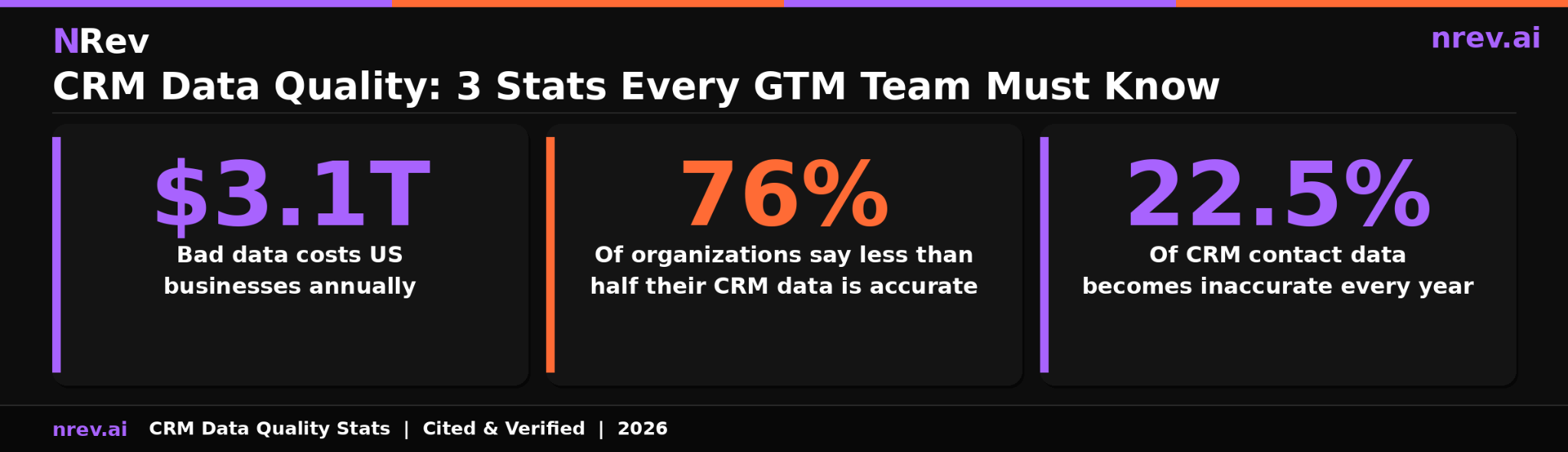
According to IBM's research published by Harvard Business Review, poor data quality costs US businesses approximately $3.1 trillion annually. Root source: IBM data quality research cited by Harvard Business Review, authored by Dr. Thomas Redman of Data Quality Solutions.
According to Prospeo's CRM data quality analysis, which cites Validity's 2026 report as its root source, 76 percent of organizations report that less than half of their CRM data is accurate and complete. Root source: Validity 2026 State of CRM Data report.
Beyond the top-line numbers, poor CRM data quality creates specific, measurable damage at three points in the revenue funnel.
At the top of the funnel, bad contact data means email campaigns bounce, phone calls reach nobody, and LinkedIn outreach goes to people who no longer hold the title or role your message references. Bounce rates above 3 to 5 percent damage your sender domain reputation progressively, reducing deliverability for every email your team sends, including to valid contacts.
In the middle of the funnel, bad opportunity data corrupts lead scoring, misdirects routing decisions, and produces inaccurate pipeline reports. When deal stages are outdated and close dates are fictional, pipeline reviews become a process of interrogating reps about what the data should say rather than a strategic conversation about how to win.
At the forecasting level, leadership decisions about headcount, budget allocation, and market strategy are built on whatever the CRM says. When the CRM is wrong, those decisions are wrong. This is the most expensive and least visible consequence of poor data quality CRM.
Five Root Causes of Bad CRM Data
Understanding the root causes of poor CRM data quality is essential before choosing a fix. Most CRM cleanup efforts fail because they address the symptom of dirty data rather than the processes that produce it. A cleanup that does not change the underlying cause will leave you back where you started within three to six months.
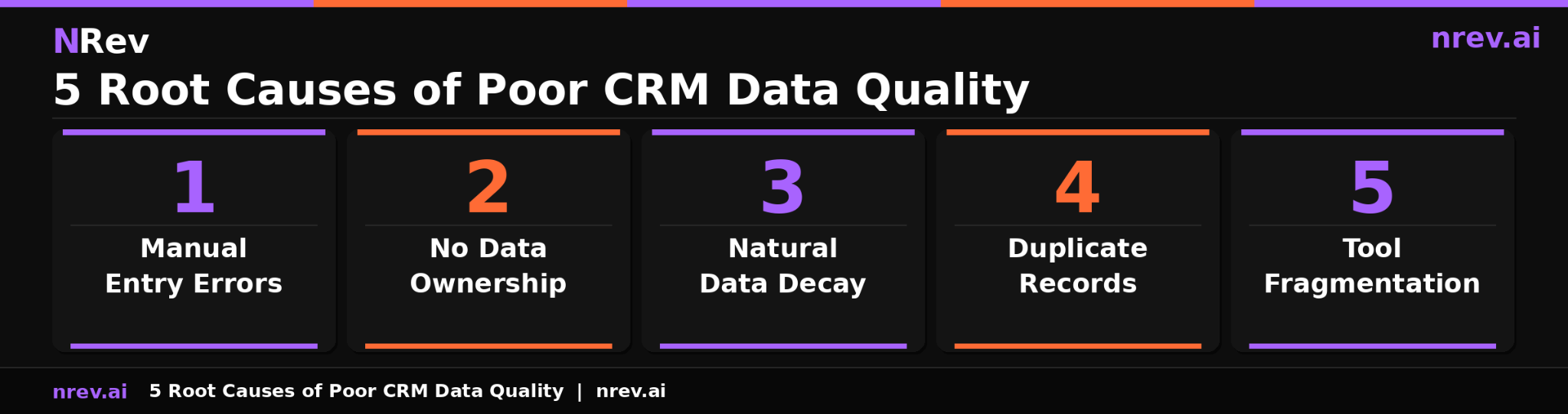
Cause 1: Manual Data Entry Errors
The largest single source of CRM data problems is human error at the point of entry. Typos in email addresses, wrong phone number formats, missing required fields, and incorrect company names entered by reps in a hurry accumulate into a significant data quality problem at scale.
The core problem is that CRM data entry is treated as an administrative task rather than a sales enablement function. Reps who view data entry as a burden fill fields quickly and inaccurately. When required fields outnumber what reps consider meaningful, many fill in placeholder data just to save a record. Prospeo's analysis notes that 37 percent of staff admit to entering inaccurate data when faced with too many mandatory fields.
Cause 2: No Clear Data Ownership
Every field in your CRM should have an owner who is accountable for its accuracy. In most B2B companies, data ownership is assumed but never formally assigned. Sales owns contact data but not company data. Marketing owns campaign data but not opportunity stages. RevOps is responsible for the overall system but does not own individual records.
When nobody owns data quality, nobody maintains it. Errors accumulate without correction. Outdated records stay in active pipeline views. Duplicate records multiply without anyone merging them.
Cause 3: Natural Data Decay
Even if your CRM is perfectly clean today, it will be 22.5 percent less accurate by this time next year without active maintenance. B2B contact data decays because people change jobs, get promoted, move companies, and update their contact information at a rate that no static database can keep pace with.
This is the cause most teams underestimate. They clean the CRM once and assume it stays clean. Data decay is not a problem you fix. It is a rate of change you continuously counteract. The only permanent solution is a system that refreshes data continuously rather than periodically.
Cause 4: Duplicate Records
Duplicate records are created every time the same contact or company enters your CRM through multiple channels without deduplication logic catching them. A contact who fills out a marketing form, gets added by a rep from a list import, and is then added again after a conference event can exist as three separate records in your CRM with inconsistent and conflicting information across all three.
Duplicates split interaction history, inflate pipeline counts, cause reps to reach out to the same contact multiple times from different records, and corrupt any analytics that count records as unique accounts or contacts.
Cause 5: Tool Fragmentation
Most B2B GTM stacks include a CRM, a marketing automation platform, an outreach sequencing tool, a dialer, an enrichment tool, and various other systems that each write data to your CRM. Every integration creates an opportunity for data conflicts, overwriting issues, and format inconsistencies.
A contact enriched from one tool may have their job title formatted differently from the same contact enriched by another tool. An opportunity updated in a sequencing tool may not sync correctly with the CRM stage. These system conflicts accumulate into a layer of data pollution that is often invisible until someone tries to pull a reliable segment list and cannot.
How to Diagnose the Current State of Your CRM
Before implementing any CRM data cleansing effort, you need a baseline measurement of where your data quality actually stands. Without measurement, you have no way to prioritize your cleanup effort or prove that it worked.
Run four diagnostic checks across a representative sample of at least 500 records from your active pipeline and contact database.
Email deliverability test: Export a sample of active contact emails and run them through a bulk verification tool. Any rate above 3 to 5 percent invalid addresses indicates a significant data accuracy problem. Above 10 percent is a crisis that is actively damaging your sender reputation.
Duplicate rate check: Use your CRM's native deduplication report or a third-party tool to identify how many records have matching or near-matching contact names, email domains, or phone numbers. A duplicate rate above 5 percent means your pipeline numbers and contact counts are inflated by a meaningful margin.
Field completion audit: Identify your five most critical fields for sales and marketing, typically email, phone, company, job title, and account tier, and measure what percentage of active records have all five populated. Below 70 percent completion on critical fields means your segmentation and routing are working from incomplete information.
Recency check: Flag every opportunity record that has not been updated in 30 days and every contact that has had no engagement activity in 90 days. These records are prime candidates for data decay and should be verified before being included in any pipeline report or outreach campaign.
This diagnostic gives you a data quality score for your CRM. It tells you which problem to fix first based on where the greatest damage is currently occurring.
CRM Data Cleansing: A Step-by-Step Fix
CRM data cleansing is the process of systematically identifying and correcting or removing inaccurate, incomplete, duplicate, and outdated records. It is not a one-week project. For most B2B companies, a proper cleansing cycle takes four to eight weeks depending on database size and the number of systems feeding data into the CRM.
Step 1: Freeze the inflow of new bad data.
Before cleaning what is already in the CRM, stop the source of new bad data. Implement field validation rules that reject improperly formatted email addresses, phone numbers, and required fields at the point of entry. Replace free-text fields with standardized dropdowns wherever possible. Reduce the number of required fields to only what reps genuinely need to log a contact, and move optional enrichment to an automated layer rather than a manual entry requirement.
Step 2: Deduplicate existing records.
Run a full deduplication pass across your contact and account records. Most CRMs have native deduplication tools. For Salesforce, tools like Cloudingo and Plauti offer more robust matching logic for large databases. For HubSpot, the native duplicate management tool handles most standard cases. When merging records, the rule is always to preserve the most complete and most recently verified version of each field rather than defaulting to the oldest record.
Step 3: Verify and update contact data.
Run every active contact record through an email verification pass. Invalid and undeliverable addresses should be flagged, suppressed from active sequences, and either manually verified or removed. Simultaneously, run a data enrichment pass to fill in missing fields and update job titles and company information for contacts that have likely changed roles based on tenure and activity patterns.
Step 4: Audit and update opportunity records.
Every open opportunity should be reviewed against a set of criteria: Has it been updated in the last 30 days? Does the close date reflect a real timeline? Is the deal stage consistent with the last documented interaction? Opportunities that fail these checks should either be updated immediately or moved to a closed-lost or nurture status. Allowing fictional opportunities to remain in an active pipeline corrodes forecast accuracy and misleads leadership.
Step 5: Establish data governance before declaring completion.
A cleanup without governance produces a clean CRM for approximately 90 days and then returns to its previous state. Assign a data owner for each data category. Document what correct data looks like for each field. Build a quarterly audit into your RevOps calendar. Define the threshold at which a record is considered stale and set automated flagging to surface those records for review.
How to Maintain CRM Database Quality Permanently
The difference between teams that solve their CRM data quality problem and teams that clean and re-dirty their CRM on a 12-month cycle is the presence or absence of a permanent maintenance system.
Permanent CRM database maintenance has three components: continuous enrichment, automated decay detection, and governance accountability.
Continuous enrichment means connecting your CRM to a data enrichment layer that monitors active records for changes and updates fields when a contact changes jobs, a company updates its employee count, or a phone number is reassigned. Unlike batch enrichment that runs quarterly, continuous enrichment prevents decay from accumulating between cycles. This connects directly to the lead enrichment tools your team uses to keep contact data current.
Automated decay detection means building CRM workflows that flag records when they meet stale criteria: no update in 30 days, email bounced more than once, contact tenure suggesting a likely role change, or company funding status changed. These flags surface records for review before the decay compounds into a pipeline-level problem.
Governance accountability means someone is specifically responsible for each data quality metric, auditing it on a regular cadence, and reporting the results to leadership. Data quality does not maintain itself. It requires the same intentional ownership that pipeline management requires.
For teams focused on outbound sales automation, a continuously maintained CRM is not a nice-to-have. It is the prerequisite for the system to function. Automated sequences built on bad contact data produce bad results regardless of how well the copy is written. Every improvement in data quality translates directly into improvement in outbound reply rates, meeting rates, and pipeline conversion.
Sales Data Management: Connecting Data Quality to Pipeline Performance
Sales data management is the broader discipline that connects CRM data quality to the pipeline outcomes your team is measured on. A well-managed CRM is the single most controllable variable in sales cycle velocity, forecast accuracy, and rep productivity.
Once the records are trustworthy, the same fields become CRM signals that tell a rep which account moved this week.
When CRM data quality is high, reps start each day knowing which accounts to prioritize, having accurate contact information for those accounts, and being able to trust that the deal stages they are looking at reflect real conversations. When data quality is low, reps start each day doing research that should already be done, chasing contacts who have left, and updating records that should update themselves.
The connection to b2b buying signals is direct. Intent signals and visitor identification data create actionable outreach opportunities. But those opportunities only get acted on efficiently when the CRM record behind them is clean. A signal that fires on a company with three duplicate records, outdated contacts, and a stale deal stage in active pipeline creates confusion rather than action.
High-quality sales data management means the CRM is a reliable source of truth that every team can build on. Marketing can segment accurately. Sales can prioritize confidently. RevOps can report truthfully. Leadership can forecast without needing to add an uncertainty discount to every number they see.
How nRev AI Uses CRM Data Quality to Power Accurate Outbound
nRev AI relies on accurate CRM data to function at its best. When a buying signal fires, whether from website visitor intent, third-party intent data, or external trigger events, nRev cross-references that signal against your CRM to determine whether the account is already in the pipeline, whether the right contacts are identified, and what context exists from prior outreach.
When CRM data is clean, this cross-reference produces a precise, personalized outreach: the right message, to the right person, referencing the right context, routed to the right rep. When CRM data is dirty, the cross-reference surfaces duplicates, missing contacts, and stale deal stages that require manual intervention before any outreach can happen.
The teams that extract the most value from signal-based outbound are the teams that have invested in CRM data quality first. A clean CRM is not a precondition for starting with nRev. But it is the condition under which nRev produces the most consistent pipeline results.
If you are starting from a dirty CRM, nRev's enrichment integrations can help. As signals fire and contacts are identified, nRev appends and verifies contact data automatically, building CRM accuracy as a byproduct of the outbound workflow rather than requiring a separate cleanup project to precede it.
Fix Your CRM Data and Start Building Pipeline You Can Trust
Every bounced email, missed forecast, and misrouted lead starts in the same place: a CRM record that does not reflect reality. Fixing CRM data quality is not a one-time cleanup. It is a system that keeps data accurate as the real world changes.
nRev AI connects clean CRM data to the outbound action it enables. When intent signals fire, nRev identifies the right contacts, builds the personalized outreach, and routes it to the right rep, all from a foundation of accurate data. You describe the workflow. nRev runs it.
Build your first signal-triggered outbound workflow on nRev AI and start turning accurate CRM data into a pipeline that closes.
Frequently Asked Questions
What is CRM data quality?

How do you improve CRM data quality?
What causes poor data quality in CRM?