


You posted on LinkedIn. The number next to "Impressions" keeps climbing. But what does it actually mean? Is it how many people read your post? How many clicked it? How many saw it?
This guide gives you the exact answer, straight from LinkedIn's own documentation. You will learn what impressions measure, how they differ from views and reach, what a good number looks like for your account size, and how to grow yours consistently.
What Do Impressions Mean on LinkedIn?
If you have ever posted on LinkedIn and seen a number labeled "Impressions" climb into the hundreds or thousands, it is easy to assume that means thousands of people read your post.
It does not mean that.
Impressions on LinkedIn measure how many times your content appeared on a screen. Not how many people read it. Not how many people clicked it. Just how many times it showed up.
According to the official LinkedIn Help Center, an impression is counted every time your post is at least 50 percent visible on a signed-in member's screen for at least 300 milliseconds. That is LinkedIn's own definition, sourced directly from their platform documentation.
This guide covers everything you need to know: what impressions actually measure, how they differ from views and reach, what counts as a good number, and how to increase yours without gimmicks.
Alt text: What do impressions mean on LinkedIn clear answer 2026 Caption: Every time your post appears on someone's screen, that is one impression. Here is what that actually means for your content.
The Official Definition: What Is a LinkedIn Post Impression
Before anything else, let us start with exactly what LinkedIn itself says. Most guides define impressions in their own words. This one goes straight to the source.
A LinkedIn post impression is the total number of times your content appears on a signed-in member's screen.
It does not matter if the person engaged with it, clicked it, or even paused to read it. As long as your content was at least 50 percent visible on their screen for at least 300 milliseconds, LinkedIn records it as one impression.
The source for this definition is LinkedIn's own platform documentation. The LinkedIn Content Analytics Help page (opens in new tab) states: impressions show the number of times a post is visible for at least 300 milliseconds with at least 50 percent of the post in view on a signed-in member's device screen or browser window.
One person can generate multiple impressions from a single post. If your post appears in their feed, then appears again when a connection shares it, that counts as two impressions from the same person.
How LinkedIn Counts Impressions
Knowing the definition is one thing. Understanding where impressions actually come from helps you make smarter decisions about how you publish and distribute your content.
LinkedIn counts an impression every time your content appears on any of the following surfaces:
- Your connection's feed. This is the most common source of impressions. When LinkedIn's algorithm pushes your post to someone's feed, each display counts.
- Shared content. When one of your connections reposts your content, everyone in their network who sees that shared post also counts toward your impression total.
- Search results. If your post surfaces in a LinkedIn search, each display counts as an impression.
- Notifications. When your post appears inside someone's notification panel, that counts too.
One important rule: impressions count every appearance, including repeat appearances for the same user. This is why your impression count is almost always higher than your reach or unique viewers count.
Your own views of your own post also count. Every time you open your post to check comments or stats, you are adding to the impression number.
The 3 Types of LinkedIn Post Impressions
Not all impressions come from the same place. LinkedIn separates them into three distinct categories, and each one tells you something different about how your content is spreading.
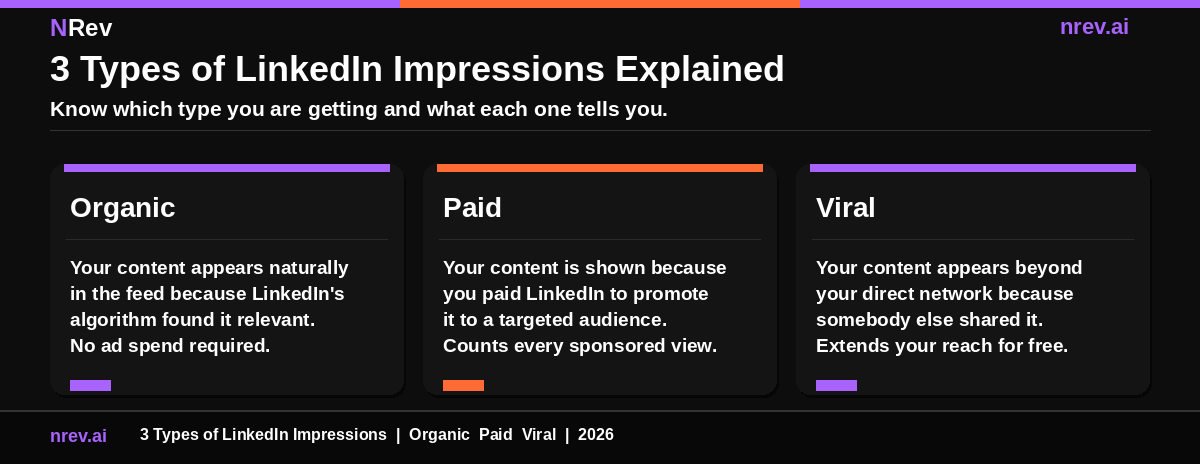
There are three types of impressions that contribute to your LinkedIn post impression total.
Organic impressions are earned without any ad spend. LinkedIn's algorithm distributes your content to your connections and their extended networks based on relevance, engagement signals, and content quality. The more engagement your post generates in the first hour after publishing, the more organic impressions LinkedIn will serve.
Paid impressions come from LinkedIn's advertising platform. When you boost a post or run a sponsored content campaign, LinkedIn shows your content to a targeted audience outside your organic network. Every time that sponsored post appears on a target member's screen, it adds a paid impression to your count.
Viral impressions occur when someone in your network reposts your content and their connections see it. These impressions happen entirely outside your direct network and cost nothing. A post that gets heavily reshared can accumulate viral impressions that far exceed its organic reach.
Most LinkedIn analytics dashboards break these three types down separately so you can see exactly where your impressions are coming from.
LinkedIn Impressions vs Views vs Reach
This is the question most people type into Google right after they check their analytics for the first time. The three metrics sit right next to each other in LinkedIn's dashboard, but they count completely different things.
This is where most people get confused. Impressions, views, and reach all sound similar but they measure three completely different things.
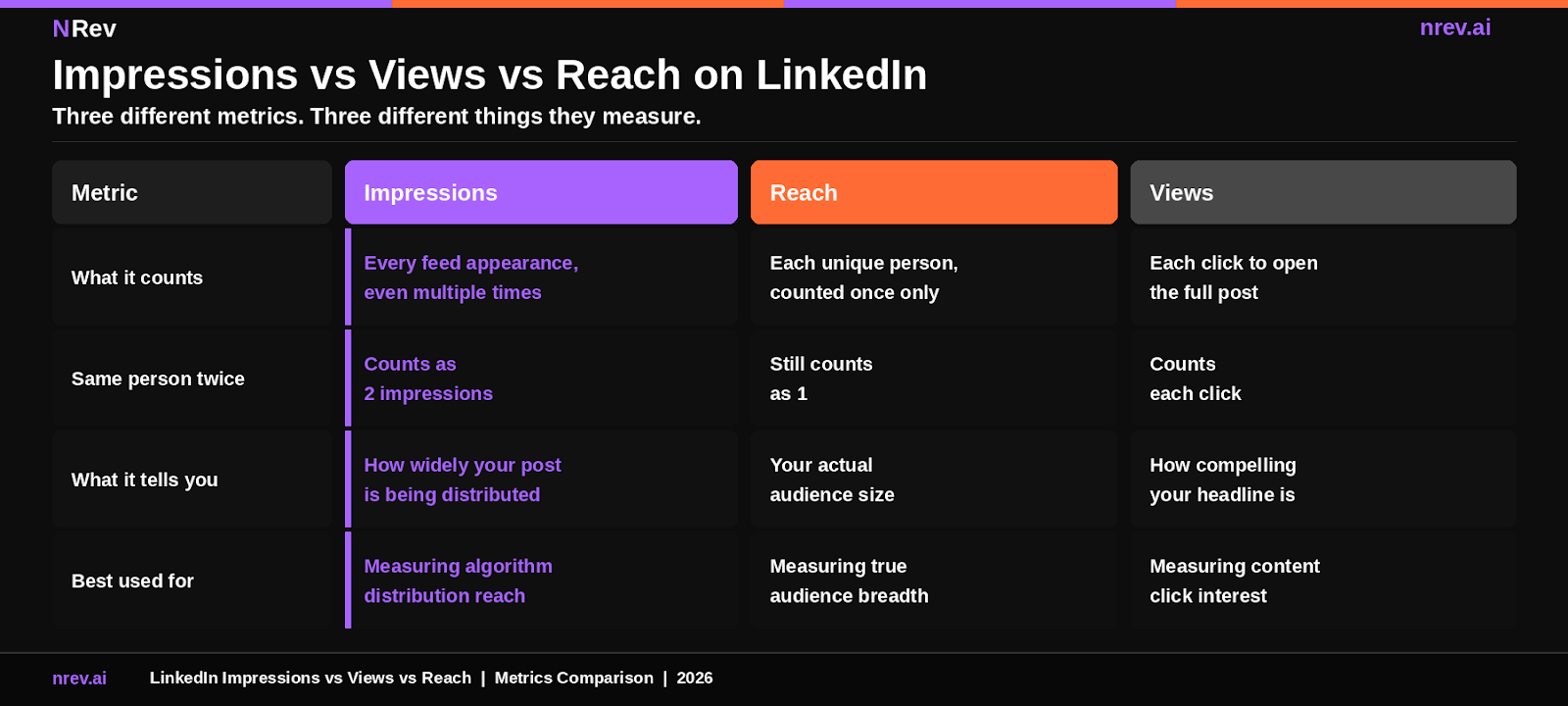
Here is the simplest way to understand the difference.
Impressions count every time your post appears on any screen, including multiple times for the same person. If your post appears in someone's feed on Monday and again on Tuesday after a colleague shares it, that is two impressions from one person.
Reach (also called "members reached" inside LinkedIn analytics) counts only the unique number of people who saw your post. Each person counts once, no matter how many times they see it. Reach gives you the true audience size.
Views on LinkedIn work differently depending on the content type. For articles, a view is counted when someone clicks to open the full article page. For videos, a view counts after at least three seconds of watch time. For standard text posts, LinkedIn does not show a separate "views" metric because impressions serve that function.
The practical takeaway: use impressions to measure how aggressively LinkedIn's algorithm is distributing your content. Use reach to measure your actual audience size. Use views to measure how compelling your headline or hook is.
What Is a Good Number of Impressions on LinkedIn
This is the most common follow-up question after someone checks their analytics. The honest answer is that it depends, but there are useful reference ranges you can use as a starting point.
There is no single universal benchmark because your impression count scales with your network size and posting consistency.
Here is a practical framework based on network size, drawn from LinkedIn analytics research published by Social Insider's 2026 LinkedIn Benchmarks Report, which analyzed 1.3 million LinkedIn business posts.
For personal profiles:
- 500 to 1,000 connections: 300 to 500 impressions per post is solid
- 1,000 to 3,000 connections: 500 to 1,500 impressions per post is solid
- 3,000 or more connections: 1,500 to 10,000 or more impressions per post
For company pages:
- Under 1,000 followers: 300 to 600 impressions per post
- 1,000 to 10,000 followers: 600 to 2,000 impressions per post
- Over 10,000 followers: 2,000 to 20,000 or more impressions per post
Raw impression counts matter less than your impression-to-engagement ratio. The Social Insider 2026 report found LinkedIn's average engagement rate is 5.20% in 2026, based on analysis of 1.3 million posts. That figure is calculated as: (total engagements divided by total impressions) multiplied by 100.
A post with 500 impressions and 40 engagements is performing better than a post with 5,000 impressions and 10 engagements. Always read impressions alongside engagement, not in isolation.
Why Impressions Matter for B2B and GTM Teams
Most articles treat impressions as a creator metric. For B2B and GTM teams, they are something more specific: an early pipeline signal that shows whether the right people are seeing your content before you ever send an outbound message.
For B2B operators and GTM teams, impressions are the top of your LinkedIn pipeline funnel. They represent every opportunity to put your brand, insight, or offer in front of a potential buyer.
LinkedIn is the dominant B2B social channel. According to LinkedIn's own marketing data, 4 out of 5 LinkedIn members drive business decisions at their organizations. Every impression your content earns is one more chance to reach a decision maker who might become a qualified lead.
Impressions also serve a secondary function that most teams miss: they tell you what your audience actually wants to read. A post that earns 10 times your usual impressions is a signal that the topic, format, or hook is resonating. That is data you can use to plan your next 10 posts.
For sales and outbound teams using signal-based outbound workflows, high-impression content creates warm prospects. When a potential buyer has seen your post three times before you reach out, your outbound message lands differently than a cold message from someone they have never encountered.
This is why connecting your LinkedIn content analytics to your LinkedIn lead generation system matters. Impressions are not just a vanity metric. They are the earliest stage of a pipeline event.
How to Increase Your LinkedIn Impressions
There is no shortcut that reliably works without eventually damaging your account or engagement rate. What does work is a set of consistent habits that align with how LinkedIn's algorithm distributes content. Here are the ones that actually move the number.
These are the factors LinkedIn's algorithm responds to most consistently, based on what the platform's own documentation and 2026 benchmark data show.
Post at the right time. LinkedIn content performs best on weekdays, specifically Tuesday through Thursday, between 7 and 9 AM and 12 and 1 PM in your audience's local time zone. Publishing outside of active hours means your post enters the feed when fewer people are scrolling, which reduces early engagement, which reduces algorithmic distribution.
Earn early engagement. The first 60 to 90 minutes after posting are critical. LinkedIn's algorithm shows your content to a small test group first. If that group engages quickly, the algorithm distributes the post more widely. Responding to every early comment during this window signals activity and compounds impressions significantly.
Use formats that LinkedIn's algorithm favors. The Social Insider 2026 report found that for pages under 50,000 followers, multi-image posts generate the highest impressions per post. For pages above 50,000 followers, polls take the top spot. Document posts (carousels) consistently outperform plain text posts in both impressions and engagement rate.
Write a hook that stops the scroll. The first one or two lines of your post determine whether anyone reads the rest. LinkedIn's feed truncates posts after two to three lines. If your opening does not give people a reason to click "see more," your impressions will be high but your engagement will be low, which tells the algorithm your content is not worth distributing further.
Post consistently. LinkedIn's algorithm tracks posting frequency and treats regular contributors as higher-priority content sources. Gaps of more than a week consistently result in lower impression counts for the next post you publish. Three to five quality posts per week is the range where most B2B operators see steady impression growth without sacrificing quality.
Avoid external links in the post body. LinkedIn actively reduces the reach of posts that direct users off-platform. If you need to share a link, put it in the first comment, not the post body itself. Your impressions on linked posts will be noticeably lower than on native content.
For teams building systematic LinkedIn outreach automation workflows, consistent high-impression content creates a warmth layer that makes outbound significantly more effective. Prospects who have already seen your posts five times are far easier to convert.
How to Find Your Impression Data on LinkedIn
You do not need a third-party tool to see your impression numbers. LinkedIn shows this data natively, and it is easier to find than most people realize.
You can also analyze any LinkedIn post’s performance with our free tool, which reads a public post and shows what its reach and engagement actually look like.
Checking your impression count on LinkedIn takes three clicks.
For a single post: Go to any post you have published. Below the post, you will see a small graph icon or a line showing impression count. Click it to open the full post analytics view. This shows your total impressions, broken down by organic, paid, and viral if applicable.
For your personal profile activity: Go to your LinkedIn profile. Scroll to the "Activity" section. Click "See all activity" and then filter to "Posts." Each post shows its impression count below it.
For a LinkedIn Company Page: Go to your page, click "Analytics" in the top navigation, then select "Content." You will see impressions for every post you have published, along with engagement rate, reactions, comments, and reposts.
LinkedIn stores impression data for up to 1,000 days for all content types, according to the LinkedIn Help Center.
Every LinkedIn impression your content earns is a potential buyer seeing your name.
nRev AI helps GTM teams turn that visibility into actual pipeline. Detect buying signals, automate outreach timing, and reach out to prospects right after they have already seen your content.
Build your first LinkedIn workflow on nRev AI and connect your content impressions to a real outbound system.
Frequently Asked Questions
What do impressions mean on LinkedIn?

Impressions on LinkedIn are the total number of times your content appeared on a signed-in member's screen.
According to LinkedIn's official Help Center, a post must be at least 50 percent visible on screen for at least 300 milliseconds to count as one impression. The same person seeing your post twice counts as two impressions. Impressions measure how widely LinkedIn is distributing your content, not how many unique people saw it or engaged with it.
What is the difference between LinkedIn impressions and views?
Impressions count every time your post appears on any screen, including repeat appearances for the same person.
Views on LinkedIn work differently depending on the content type: for articles, a view requires someone to click through and open the full article; for videos, a view requires at least three seconds of watch time.
For standard text posts, LinkedIn uses impressions as the primary visibility metric rather than a separate "views" counter. Impressions are a distribution metric. Views are a consumption metric.
What are LinkedIn post impressions vs reach?
LinkedIn post impressions count the total number of times your content appeared on any screen, including multiple counts for the same person.
Reach, which LinkedIn labels as "members reached" in your analytics dashboard, counts only the unique number of people who saw your post, with each person counted once regardless of how many times they saw it. Impressions are almost always higher than reach.
The gap between the two tells you how much of your distribution is repeat exposure to the same audience versus new people seeing your content for the first time.