

Data Matching Tools: Find, Link, and Unify Every Record Across Your Database
Every organization that collects data from multiple sources eventually ends up with the same problem: the same contact, company, or customer exists in multiple places under slightly different names, with conflicting information, and no single source of truth. Data matching tools are the technology that finds those connections, links the related records, and creates a clean, unified view your entire team can trust.
The problem is not only about duplicate records. It is about fragmented intelligence. When "Acme Corp," "Acme Corporation," and "ACME Corp, Inc." exist as three separate account records across your CRM, marketing platform, and billing system, you have no complete view of that customer relationship. You cannot accurately measure their lifetime value, you cannot route new leads to the right owner, and you cannot trust any report that includes their activity. Data matching tools close that gap by identifying which records belong to the same real-world entity, regardless of how inconsistently the data was entered.
This guide covers what data matching tools are, the three matching methods that power them, what to look for in a data matching solution, the best data matching software for B2B teams in 2026, and how data matching connects to the outbound workflows your sales team depends on.

What Are Data Matching Tools and Why Do B2B Teams Need Them
Data matching tools are software platforms that compare records across one or more datasets to identify which entries refer to the same real-world entity. The goal is to link related records, eliminate confirmed duplicates, and produce a single master record that consolidates the most accurate information from every source.
The technical term for this process varies: record linkage, entity resolution, identity resolution, and deduplication are all related terms that describe specific applications of data matching. Record linkage connects records across separate systems. Deduplication finds and removes duplicates within a single system. Identity resolution tracks a single person or company across multiple touchpoints and channels. All of these applications rely on the same underlying data matching technology.
For B2B teams, data matching is most critical in three contexts. First, when data enters the CRM from multiple channels simultaneously: form fills, list imports, manual entry by sales reps, marketing automation syncs, and enrichment tool outputs all create records that may duplicate existing entries. Second, when data needs to connect across systems: matching a lead record in a marketing automation tool to the correct account record in the CRM is a data matching problem that, if unsolved, produces inaccurate pipeline attribution. Third, when historical databases are cleaned or merged: any time two databases are combined, either through a company acquisition, a system migration, or a database consolidation project, data matching tools handle the process of identifying which records across both datasets belong to the same entity.
The Business Cost of Unmatched and Duplicate Records
The financial case for investing in data matching tools is quantified by some of the most consistently cited research in data quality.
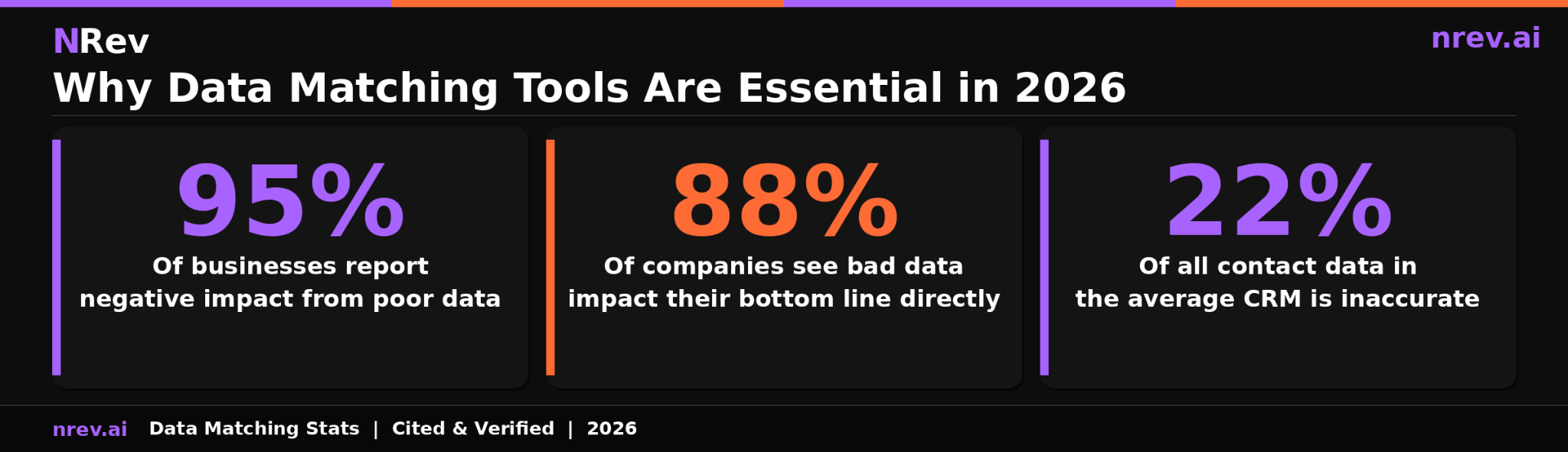
According to Experian's Global Data Management Report, which surveyed 1,000 data practitioners from organizations worldwide, 95 percent of businesses report seeing detrimental effects from poor data quality, affecting customer experience, business efficiency, and organizational reputation. Root source: Experian Global Data Management Report, 2019, survey of 1,000 data practitioners across four countries.
According to Experian Data Quality's research on the cost of bad data, which cites Experian's primary research as its root source, bad data has a direct impact on the bottom line of 88 percent of companies, with the average company losing approximately 12 percent of its total revenue. Root source: Experian Data Quality research on the revenue impact of inaccurate data.
The third number that shapes the urgency is from Experian's own published research: the average organization estimates that 22 percent of all its contact data is inaccurate in some way. For a database of 50,000 records, that is 11,000 contacts that your team is either unable to reach, routing to the wrong owner, or analyzing with incorrect firmographic attributes.
For B2B sales and marketing teams, these abstract data quality numbers translate into specific revenue damage. Duplicate accounts in your CRM inflate your pipeline coverage ratio, making the number look healthier than it is. Duplicate contacts cause the same prospect to receive multiple outreach sequences simultaneously, damaging your sender reputation and your relationship with that prospect. Unmatched leads that are not correctly associated with their parent account get routed to the wrong rep or not followed up at all, losing opportunities that were warm when they entered your system.
Three Data Matching Methods and When to Use Each
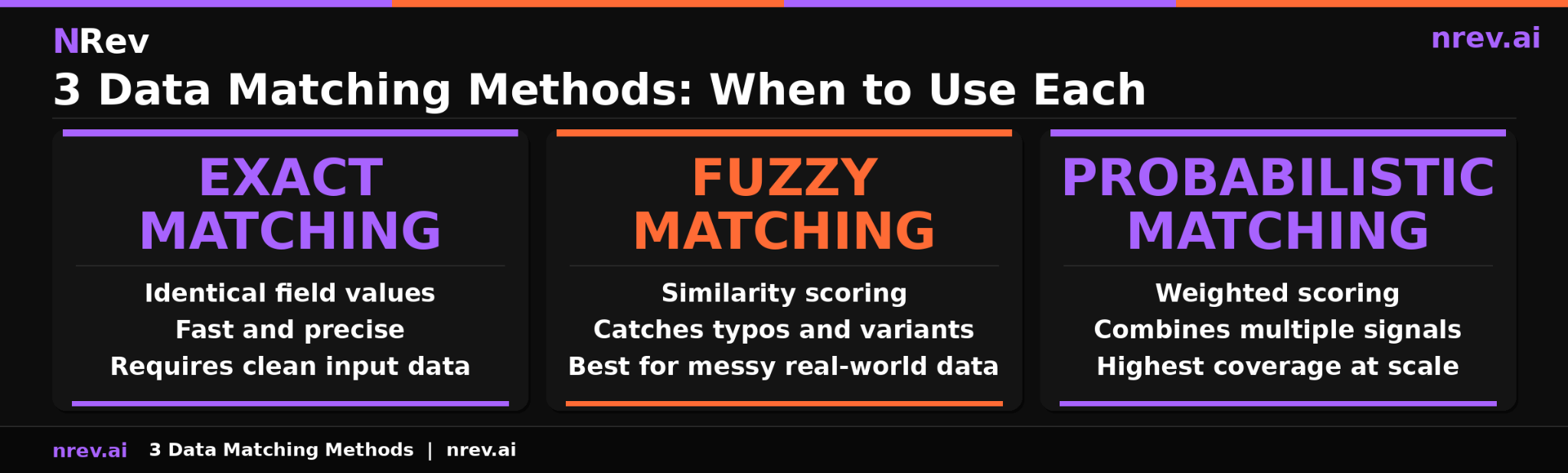
Data matching software uses three primary methods to identify when two or more records refer to the same entity. Most enterprise platforms combine all three into a hybrid approach because each method has distinct strengths and failure modes.
Method 1: Exact Matching
Exact matching, also called deterministic matching, compares records based on identical field values. If two records share the same email address, phone number, or unique identifier, they are flagged as the same entity and merged or linked automatically.
Exact matching is the fastest and most precise method available. It produces zero false positives when the matching field is truly unique, such as an email address or a customer ID. Its limitation is brittleness: if even one character differs between two records representing the same entity, exact matching will miss the connection entirely. "john.smith@acmecorp.com" and "jsmith@acmecorp.com" will not be matched by an exact algorithm even though they likely represent the same person.
Exact matching is most appropriate as the first pass in any data matching workflow, where it quickly and accurately handles records with shared unique identifiers, leaving the remainder for fuzzy or probabilistic review.
Method 2: Fuzzy Matching
Fuzzy matching, also called approximate string matching, identifies records that are similar but not identical by calculating a similarity score between field values. Rather than requiring exact character agreement, fuzzy matching uses algorithms such as Levenshtein distance, Jaro-Winkler, or Soundex to measure how close two values are and returns a match score between 0 and 100.
This is the method that catches what exact matching misses. "Acme Corp" and "Acme Corporation" will score above the matching threshold. "Jennifer Williams" and "Jen Williams" will match. "New York" and "New Yrk" will match. Fuzzy matching handles the messy reality of human-entered data: abbreviations, nicknames, typos, inconsistent formatting, and variations in how the same company name is written across different systems.
The key configuration decision in fuzzy matching is setting the similarity threshold: the score above which two records are considered a match. Thresholds that are too high produce false negatives, missing real matches. Thresholds that are too low produce false positives, incorrectly merging distinct records. Most enterprise data matching tools recommend setting different thresholds by field type and use case, and flagging records that fall in a middle range for human review rather than automated merging.
Method 3: Probabilistic Matching
Probabilistic matching weighs the likelihood that two records refer to the same entity by combining similarity scores across multiple fields. Rather than relying on any single field, it uses a weighted scoring model that considers partial agreement across name, email, company, phone, address, and other available fields simultaneously.
The advantage over single-field fuzzy matching is both accuracy and coverage. A record with no matching email but matching name, company, and phone number will receive a high probabilistic score. A record with a similar but not identical name and a matching city will receive a lower score. This approach handles the most complex matching scenarios, such as records with incomplete data, records that have been entered differently across multiple systems over several years, and records where no single identifying field reliably matches.
Most enterprise data matching solutions use probabilistic matching for their most difficult cases, flagging high-confidence matches for automatic merging and borderline cases for manual review.
Key Features to Look for in a Data Matching Solution
Not all data matching solutions are built for the same use case or team size. The criteria below apply specifically to B2B GTM and RevOps teams evaluating data matching software for CRM and marketing database management.
Matching algorithm flexibility
The most important technical criterion is whether the platform supports all three matching methods and allows you to configure thresholds and weights for your specific data. A tool that only does exact matching will miss a significant portion of your real duplicates. A tool that only offers pre-set fuzzy matching thresholds may produce too many false positives for your data type or not enough matches for your tolerance level.
Native CRM integration
For B2B sales teams, the value of data matching is only fully realized when matches flow directly into the CRM rather than requiring manual export and import. Native integration means matched records are automatically merged or flagged within Salesforce or HubSpot, without a data engineer needing to run a nightly batch job. Real-time matching on record creation, where new leads are checked against existing records the moment they enter the system, is the most effective configuration for preventing duplicates from accumulating.
Lead-to-account matching
B2B-specific data matching requires a capability that general-purpose data quality tools often lack: the ability to associate a new lead record to the correct parent account. When a contact fills out a form, their lead record needs to be matched to the existing account in the CRM so it routes to the right rep, inherits the correct account owner, and contributes accurately to account-level pipeline reporting. This is a different problem from simple deduplication and requires matching logic that operates across record types rather than just within a single object.
Merge survivorship rules
When two records are merged, the tool must have configurable rules that determine which value from each field survives in the master record. The default assumption that the most recently updated field is always correct is often wrong: an older enrichment result may be more accurate than a newer manual entry. Good data matching software lets you set survivorship rules by field and by data source, ensuring the highest-quality value is preserved rather than simply the most recent one.
Audit trail and merge reversibility
Merging records incorrectly is a recoverable error only if the tool maintains a full audit trail of what was merged and from which source. The ability to undo a merge, or at minimum to review which records were combined and what was discarded, is critical for teams that rely on their CRM data for financial reporting, compliance, or legal record-keeping.
Best Data Matching Software for B2B Teams in 2026
The data matching software market spans from lightweight deduplication tools built for a specific CRM to enterprise master data management platforms handling billions of records. Here is an honest breakdown by category.
For Salesforce-native deduplication:
DemandTools is the most established Salesforce-native data quality platform, offering configurable matching rules, mass deduplication, and scheduled maintenance jobs that run entirely within the Salesforce environment. It handles both simple deduplication and complex lead-to-account matching scenarios. Best for mid-market to enterprise Salesforce teams that want a single platform for all CRM data quality tasks.
Cloudingo offers Salesforce deduplication with an undo merge feature that DemandTools lacks, making it the safer choice for teams that are newer to automated merging and want the ability to reverse a batch merge that produced unintended results.
For lead-to-account matching specifically:
LeadAngel is purpose-built for B2B revenue operations, combining AI-powered lead-to-account matching with duplicate prevention, lead routing, and assignment automation. When a new lead enters the CRM, LeadAngel matches it to the correct account, assigns it to the right rep based on territory rules, and prevents a duplicate from being created simultaneously. Best for teams with complex routing requirements and high lead volume.
For enterprise master data management:
Informatica Cloud Data Quality provides enterprise-grade data matching with configurable fuzzy and probabilistic algorithms, support for large datasets across multiple source systems, and integration with major enterprise platforms including Salesforce, SAP, and Oracle. Best for large organizations managing data across multiple business units with strict governance and compliance requirements.
WinPure offers powerful fuzzy matching with a configurable no-code interface that makes it accessible to business users without requiring data engineering support. It supports multiple data sources, handles high volumes, and provides detailed match confidence scoring. Best for teams that need sophisticated matching logic without the cost and complexity of an enterprise MDM platform.
For developer teams building custom pipelines:
People Data Labs provides API-based record matching across its database of over 1.5 billion person profiles and 70 million companies. For teams building custom enrichment and deduplication workflows, the PDL API provides the matching engine on top of which the workflow is built. Best for engineering teams that want precise control over matching logic and integration design.
How to Run a Data Matching Project: Step by Step
A data matching project without a structured workflow produces inconsistent results and often creates new data problems while solving old ones. This seven-step process applies to both initial database cleanup projects and ongoing data matching implementations.
Step 1: Profile the data before matching.
Before running any matching algorithm, understand the structure and quality of the data you are working with. How complete are the key fields? What percentage of records have valid email addresses? Are company names stored consistently or in multiple formats? Profiling tells you which matching method will work best and which fields are reliable enough to serve as matching criteria.
Step 2: Standardize and normalize input fields.
Fuzzy matching works significantly better when the input data is normalized before comparison. Standardize company name formats: remove legal suffixes like "Inc.," "LLC," and "Ltd." from the comparison field if they are not consistently applied. Normalize phone numbers to a single format. Parse names into first and last fields if they are stored as a combined string. Standardization before matching dramatically increases the accuracy of fuzzy and probabilistic algorithms by reducing artificial variation.
Step 3: Select your matching method and configure thresholds.
For most B2B data matching projects, start with exact matching on email address and unique IDs to handle the easy cases quickly. Then apply fuzzy matching on company name, contact name, and phone number for records without shared unique identifiers. Set your similarity threshold by field type and validate it against a sample of known-good records before running at scale.
Step 4: Review borderline matches before merging.
Any match that falls in the middle of your confidence range should be flagged for human review rather than automatically merged. Assign a data steward to review these records and make the merge or no-merge decision based on contextual knowledge that the algorithm cannot access. This step prevents the most common data matching failure: incorrectly merging two records that happen to share a common name or email prefix but represent different people.
Step 5: Apply survivorship rules and merge confirmed matches.
Configure which field values survive the merge before running at scale. Document the survivorship logic so it can be audited and adjusted as edge cases emerge. Run the merge in batches and validate the output against a sample before processing the full dataset.
Step 6: Implement prevention logic at the point of entry.
Data matching is most efficient when it prevents duplicates from forming rather than cleaning them up after the fact. Connect your CRM's duplicate prevention rules to your matching logic so new records are checked against existing records the moment they are created, regardless of the entry channel.
Step 7: Schedule ongoing maintenance and monitor match quality.
Data matching is not a one-time project. New records enter your database continuously and existing records decay as contacts change jobs and companies update their information. Schedule a recurring matching and deduplication run and monitor the match rate and false positive rate over time to catch drift in data quality before it compounds into a larger problem.
Data Matching for CRM: Lead-to-Account Matching Explained
Lead-to-account matching is the B2B-specific application of data matching that most directly affects sales pipeline performance. When a new lead enters a CRM, it exists initially as a standalone contact record without an account association. Lead-to-account matching is the process that links that lead to the correct parent account so it can be routed to the right rep, scored accurately, and counted in the correct pipeline.
The same matching logic runs in reverse when you want to expand a list, and you can find lookalike companies free from any domain you have already closed.
The challenge is that lead records and account records rarely share a unique common identifier. A lead who fills out a form provides their name, email, and company name. The account record in the CRM may store the company as a slightly different name, with a different billing address and a different primary contact. Fuzzy matching on company name, combined with domain matching on email address and geographic matching on location, is what connects the two records accurately.
When lead-to-account matching fails, the consequences compound. The lead gets routed to a generic queue rather than the owning territory rep. Pipeline attribution shows the lead as a new logo rather than an existing account expansion. The account view shows no activity from the new contact, causing the rep to miss that a decision maker from an existing account is actively researching the product. All three failures are common. All three are entirely preventable with a functioning lead-to-account matching system.
For teams already investing in lead enrichment tools to fill missing fields, lead-to-account matching is the upstream step that determines whether that enriched data lands in the right account record. Enrichment without matching produces a well-completed orphan record. Matching followed by enrichment produces a complete, correctly attributed contact that your sales team can take immediately.
This directly affects crm data quality at the account level. When every lead is correctly matched to its parent account, account-level reporting becomes accurate, account-based marketing lists become reliable, and the b2b buying signals that fire at the account level are visible to the right rep rather than distributed across multiple unconnected records.
How nRev AI Uses Clean, Matched Data to Power Accurate Outbound
nRev AI depends on matched, deduplicated data to function at its best. When a buying signal fires on a target account, nRev cross-references it against your CRM to find the right contacts within that account, pull the relevant deal history, and determine whether the signal represents a new opportunity or a re-engagement of an existing relationship.
When data is unmatched, this cross-reference produces noise. The same company appears under three account records, so signal attribution is unclear. The lead who triggered the signal is not associated with the correct account, so the rep receives an alert without the context of the existing relationship. The outreach that results is generic rather than personalized to the account's history with your company.
When data is cleanly matched, nRev operates with precision. The signal resolves to the correct account. The right contacts within that account are identified. The context of prior interactions is visible. The outreach is personalized to what your team already knows about that account rather than starting from scratch.
Clean data is not a precondition for getting started with nRev. But it is the condition under which nRev produces its most accurate and most effective outbound results. The teams that invest in data matching and deduplication before scaling signal-based outbound consistently see higher reply rates and shorter time-to-meeting than those running outbound against fragmented, unmatched databases.
Stop Letting Duplicate and Fragmented Records Undermine Your Pipeline
Every duplicate record in your CRM is a split view of a real relationship. Every unmatched lead is a missed routing opportunity. Every fragmented customer account is a revenue conversation your team is having at half the intelligence it should have.
Data matching tools unify those fragments into a single, reliable source of truth. nRev AI then uses that truth to build personalized outreach the moment a buying signal fires on a matched, complete account record. You describe the workflow. nRev runs it.
Build your first signal-triggered outbound workflow on nRev AI and start reaching buyers with the context your matched data makes possible.
Frequently Asked Questions
What is data matching?

What is the difference between data matching and deduplication?
What are the best data matching tools for B2B?