

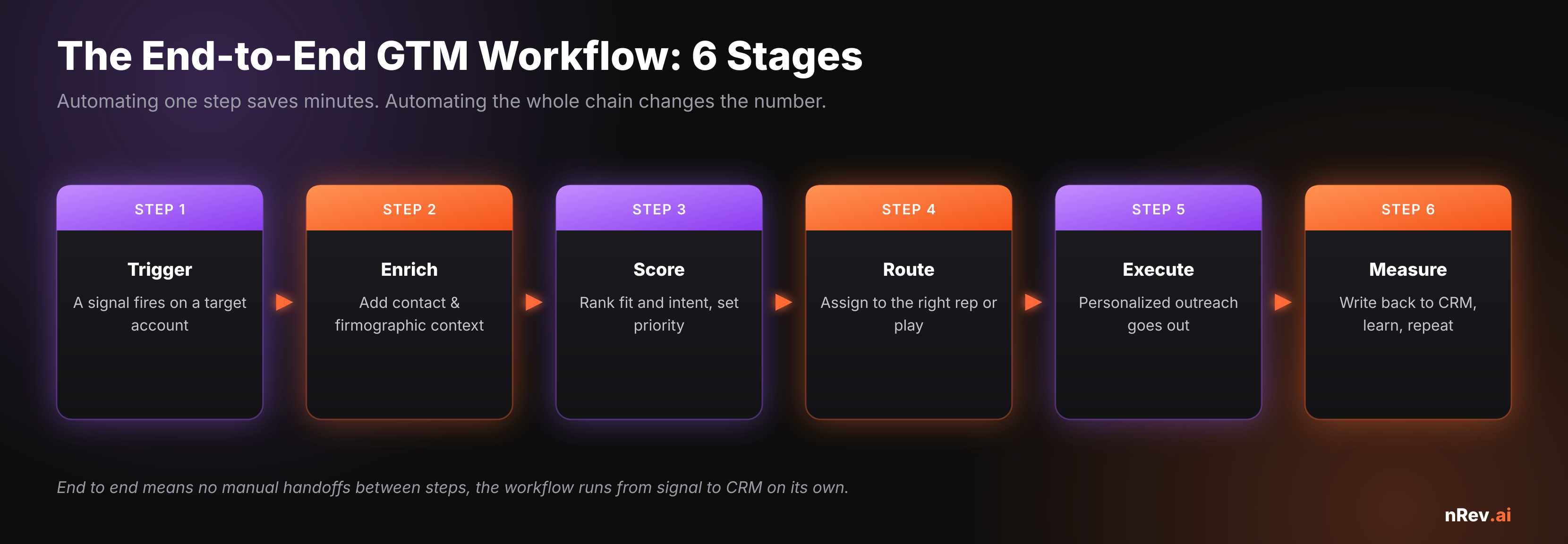
Automating one step saves minutes. Automating the whole chain - from signal to CRM write-back, with no manual handoffs - changes the number. Here’s how to build it, stage by stage.
The short version
- “End to end” means no manual handoffs - the workflow runs from signal to CRM on its own.
- Map the stages first: trigger → enrich → score → route → execute → measure.
- Automate the mechanical, keep judgment with people, and choose tooling by who will own it.
- Most breakage is at the seams between steps - design the handoffs, not just the steps.
Automating a single step - a Zap here, an enrichment there - saves a few minutes. Automating the whole chain so it runs without a human stitching the pieces together is what actually changes the number. The gap between those two is where most GTM teams get stuck: they have ten half-connected automations and a rep who still copies data between them.
The prize is reclaimed selling time. Salesforce found reps spend just 28% of their week actually selling, with most of the rest lost to data entry, list building, and deal admin - exactly the work end-to-end automation removes. This guide is the process for building it, not a tool ranking.
What “end to end” actually means: the six stages
Every GTM workflow, whether you run it by hand or automate it, moves through the same six stages. Naming them is what lets you see where the manual handoffs are - and a handoff is where automation either holds or breaks.
Step 1: Map the workflow before you automate it
Resist the urge to start building. First, write down how the workflow runs today, stage by stage, including the messy parts: who does what, in which tool, and where data gets copied by hand. That map shows you two things - the handoffs to automate first (usually the copy-paste between tools) and the stages where a human is genuinely adding judgment. Automating a broken process just makes it fail faster, so fix the sequence on paper before you wire anything.
Step 2: Decide what to automate vs. keep human
The skill in GTM automation isn’t automating everything - it’s drawing the line. Machines are reliably better at the mechanical work: enrichment, routing, list building, scheduling, monitoring. People are better at judgment: messaging calls, unusual objections, deal strategy, and the exceptions your rules didn’t anticipate.
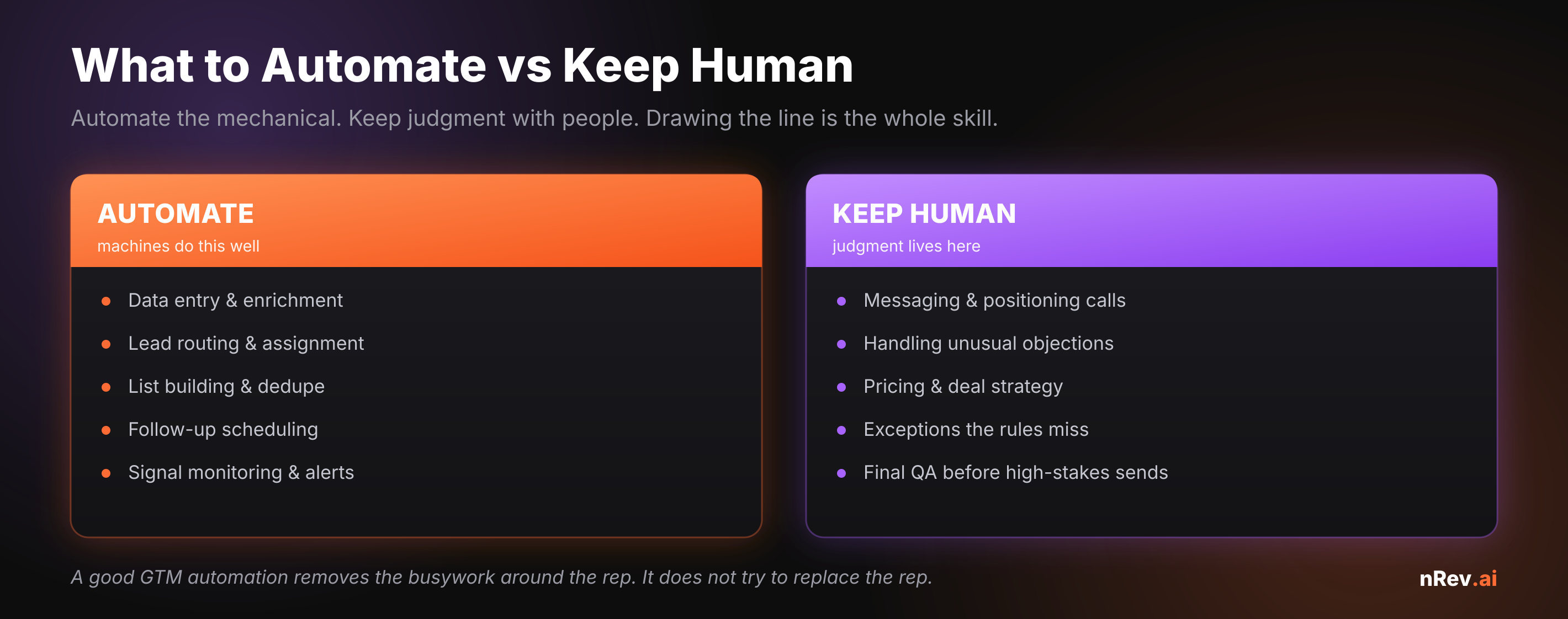
The goal is to remove the busywork around the rep, not to replace the rep. A workflow that auto-sends judgment-heavy messages without review is how good automation earns unsubscribes - which is also why the CRM feeding it has to be clean. If yours isn’t, start with our pre-send checklist on CRM data cleansing.
Step 3: Choose your tooling - no-code, low-code, or code-first
Once you know what you’re automating, pick the build environment by who will own it - not by the most powerful demo. This is the heart of evaluating no-code automation tools: a platform your ops team can actually run beats a flexible one that needs an engineer who’s always busy.
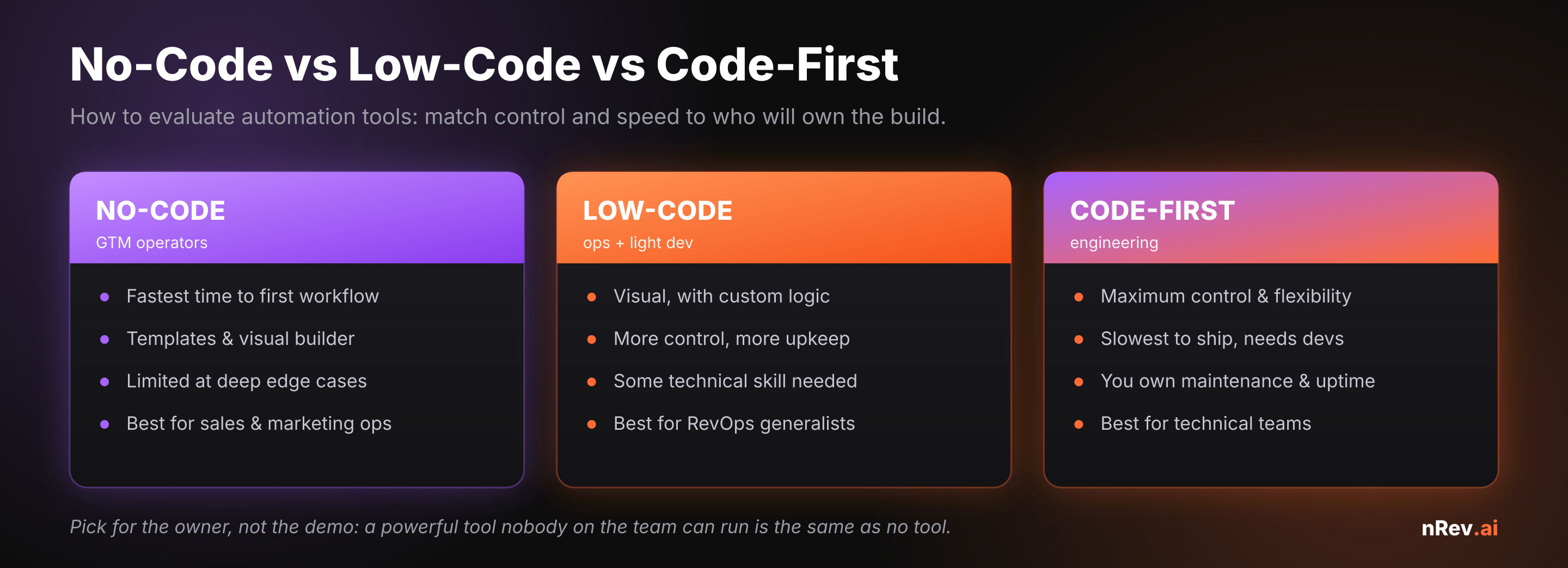
For most GTM teams the answer is no-code or light low-code, because the people closest to the revenue motion are operators, not engineers. For a deeper tool-by-tool look, see our breakdown of the best no-code AI workflow automation tools and the broader GTM workflow automation platforms compared.
Step 4: Wire the stages into one running workflow
Now connect the six stages so a trigger flows all the way to a CRM write-back with no human in between. The non-negotiable design rule is at the seams: every stage must pass complete, structured data to the next, or the chain stalls. A signal with no enrichment can’t be scored; a score with no routing rule sits idle; an execution with no write-back means the next workflow starts blind. Build it so each stage’s output is the next stage’s clean input, and test the whole path on a handful of real accounts before you turn it on. The strongest first trigger to wire up is usually a buying signal - see our guide to B2B buying signals for which ones convert.
Where end-to-end automation breaks
Three failure points account for most stalled GTM automations. The first is dirty input - garbage data at the trigger stage corrupts every downstream step. The second is a missing write-back, so the system never learns and reps work from stale context. The third is over-automation of judgment, where the workflow sends messages that should have had a human glance. Design against all three and the workflow compounds instead of decaying. It helps to remember Gartner’s finding that 99% of B2B purchases are triggered by organizational change - so your highest-value triggers are events (hiring, funding, leadership moves), and an end-to-end workflow exists to catch those events and act before a rep ever could manually.
Automate the whole chain from plain English
nRev AI is the GTM automation layer that runs all six stages for you: it watches for signals, enriches and scores them, routes to the right rep, executes the personalized outreach, and writes back to your CRM - described in plain language, no glue code between tools. You design the workflow; nRev runs it end to end.
Build your first end-to-end workflow →
For a worked example, our signal-based outbound playbook shows the full chain in action, and outbound sales automation covers the execution stage in depth.
Frequently asked questions
How do you automate GTM workflows end to end?

How do you evaluate no-code automation tools for GTM?
What GTM tasks should you automate first?
How do sales teams choose the right GTM tools?
What’s the difference between no-code and low-code automation?