


LinkedIn Lead Gen Forms are pre-filled forms that open inside a LinkedIn ad, so a prospect can submit their name, email, company, and job title with one tap without leaving the platform or typing anything. Because LinkedIn fills the fields from the member's profile, they convert better than sending people to a landing page.This guide covers how they work, how to set one up, the best practices that actually lift results, and the step most teams skip: what to do once the leads arrive.
LinkedIn Lead Gen Forms, in one line: native LinkedIn ad forms that auto-fill from a member's profile, capturing verified contact details with a single tap.
How do LinkedIn Lead Gen Forms work?
You attach a form to a SponsoredContent or Message ad in LinkedIn Campaign Manager. When someone clicks your call to action, the form opens already filled with their profile data. They confirm, tap submit, and you get a lead record with the fields you asked for. The member sees a thank-you screen with a link (to your site, a booking page, or a download), and the lead flows into Campaign Manager or your connected CRM.
Because the friction is close to zero, form fills are cheaper and higher-volume than landing-page conversions.The catch, which we'll get to, is that low friction also means lower intent per lead.
How to create a LinkedIn Lead Gen Form
1. In Campaign Manager, pick an objective that supports lead generation (Sponsored Content or Message ads).
2. Build or choose the ad, then create a new Lead Gen Form in the form template section.
3. Write the headline and offer copy, and set the fields you want (keep them minimal, more on that below).
4. Add your privacy policy URL (required) and a short custom consent line if you need one.
5. Set the thank-you screen: a clear message plus a landing-page or booking link so momentum isn't wasted.
6. Map the fields to your CRM or plan an export, then launch and monitor cost per lead.
LinkedIn Lead Gen Form best practices
• Ask for less. Every extra field drops completion. Name, work email, company, and title are usually enough. Skip phone unless you truly need it.
• Make the offer specific. A concrete resource (a benchmark report, a template, a teardown) beats a vague 'learn more'.
• Match the thank-you to intent. For a high-intent offer, send them straight to a booking link. For a download, deliver it and set expectations on follow-up.
• Sync to your CRM in real time. Leads that sit in Campaign Manager for days go cold. Connect the form to your CRM or an automation so nothing waits.
• Follow up fast. Speed to first touch is one of the biggest levers on conversion. A lead contacted within minutes beats one contacted next week by a wide margin.
The part most teams get wrong: what happens after the form fill
Here's where the leads leak. ALinkedIn Lead Gen Form captures a contact, not a qualified opportunity. Most of those form fills are curious, not ready. Teams dump them straight into a generic nurture, or worse, let them sit in Campaign Manager until someone exports a CSV on Friday. By then the intent has faded and the rep is working a two-week-old lead with no context.
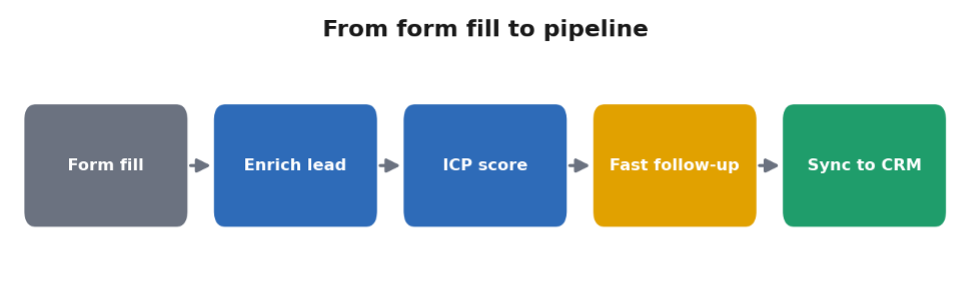
The fix is to treat the form fill as the start of a short, fast, filtered process: enrich the lead, check it against your ICP, and follow up while the interest is fresh, with a message that references what they actually downloaded.
Turning Lead Gen Form leads into pipeline with nRev
Once your Lead Gen Form leads land in your CRM (or a sheet), you can connect them to nRev to run the follow-up automatically. nRev enriches each lead into a fuller profile, scores it against your ICP so reps spend time on the right ones, and drafts a personalised follow-up across email and LinkedIn that references the specific offer they requested. A human approves before it sends, and the record syncs back to your CRM. The verified building blocks here are nRev's people enrichment, its ability to create or update a contact in HubSpot, and its LinkedIn messaging.
nRev doesn't replace CampaignManager or your ad setup. It picks up where the form ends, so a fresh lead becomes a fast, relevant conversation instead of a line in a spreadsheet. If you're building the wider motion, our LinkedIn lead generation guide covers the strategy, LinkedIn posting best practices covers the organic side that feeds your ads, and the LinkedIn Growth Engine ties engagement and follow-up together.
Frequently asked questions
What are LinkedIn Lead Gen Forms?

How do I create a LinkedIn Lead Gen Form?
How many fields should a LinkedIn Lead Gen Form have?
Where do LinkedIn Lead Gen Form leads go?
How do you follow up on LinkedIn Lead Gen Form leads?