

.jpg)
Most RevOps software gets bought backwards - best dashboard wins, then the bill surprises everyone. This is the framework: choose for the leak you’re fixing, score six criteria, and price it on total cost, not the sticker.
The short version
- Choose for the specific revenue leak you’re fixing - not the longest feature list.
- Score finalists on six criteria, then look at price; the pricing model matters as much as the number.
- Budget for total cost of ownership: license is rarely the biggest line.
- RevOps software earns its keep through alignment - aligned firms grow markedly faster.
Revenue operations software gets bought backwards more often than almost any other category. A team feels the pain of a leaky funnel, watches a competitor demo, and buys the platform with the best-looking dashboard - then discovers six months later that it solved a problem they didn’t have and missed the one they did. Choosing well starts with the leak, not the logo.
The upside of getting it right is real and measurable. Forrester found that firms with high levels of alignment across their customer-facing functions report 2.4x higher revenue growth and 2x higher growth in profitability than those without it. RevOps software is the tooling layer that makes that alignment operational - so the question isn’t “which tool is best,” it’s “which tool closes my alignment gap, at a cost I can defend.”
Step 1: Start from the leak you’re fixing
Before you shortlist anything, name the bottleneck. Is revenue leaking because leads sit unrouted, because the forecast is unreliable, because data is dirty and handoffs drop, or because no one can see the full funnel in one place? Each of those points to a different center of gravity in the product. Buying a forecasting-heavy suite to fix a routing problem is how teams end up paying for a platform they use at 20%. Write the leak down in one sentence - it becomes the lens for every criterion below.
Step 2: The 6 criteria for choosing RevOps software
Once you know the leak, score every shortlisted platform on the same six questions. Comparing on a fixed rubric is what stops the decision from being won by whoever gave the slickest demo.
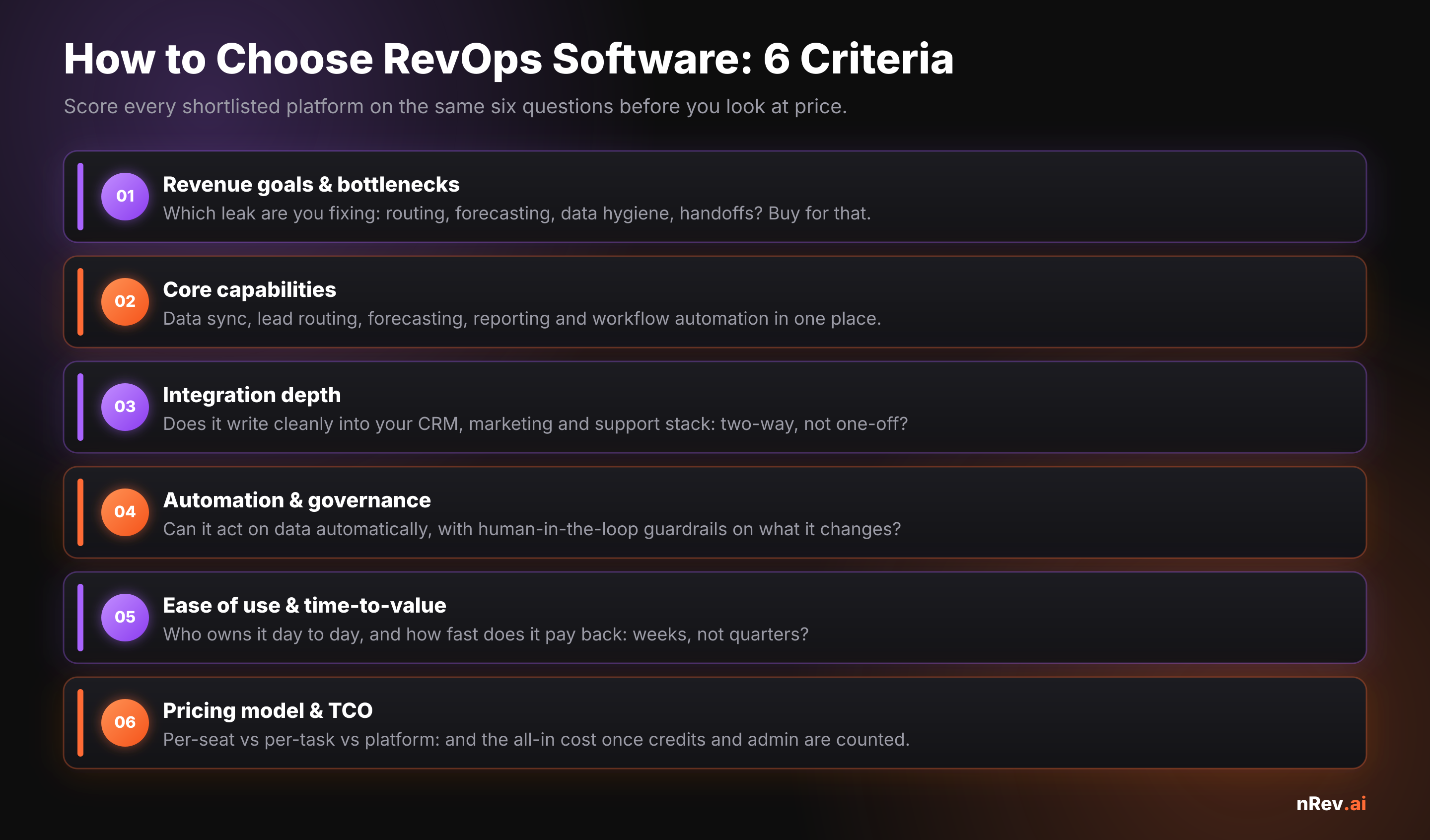
Integration depth (criterion 3) is the one teams under-weight and regret most. A RevOps tool that can’t write cleanly back into your CRM, marketing, and support systems becomes another silo to reconcile - the opposite of alignment. If your CRM is messy going in, fix that first; our guide to CRM data quality covers the baseline a RevOps platform needs to run on.
How much does revenue operations software cost?
There’s no single sticker price, because vendors charge on fundamentally different models — and the model you pick shapes your bill far more than the headline number. Entry-level tools start free or under $50 per seat; mid-market RevOps platforms typically run $50–$150 per seat per month; and full enterprise suites move to custom platform pricing. The trap is comparing a per-seat tool to a usage-based one on headline price alone.
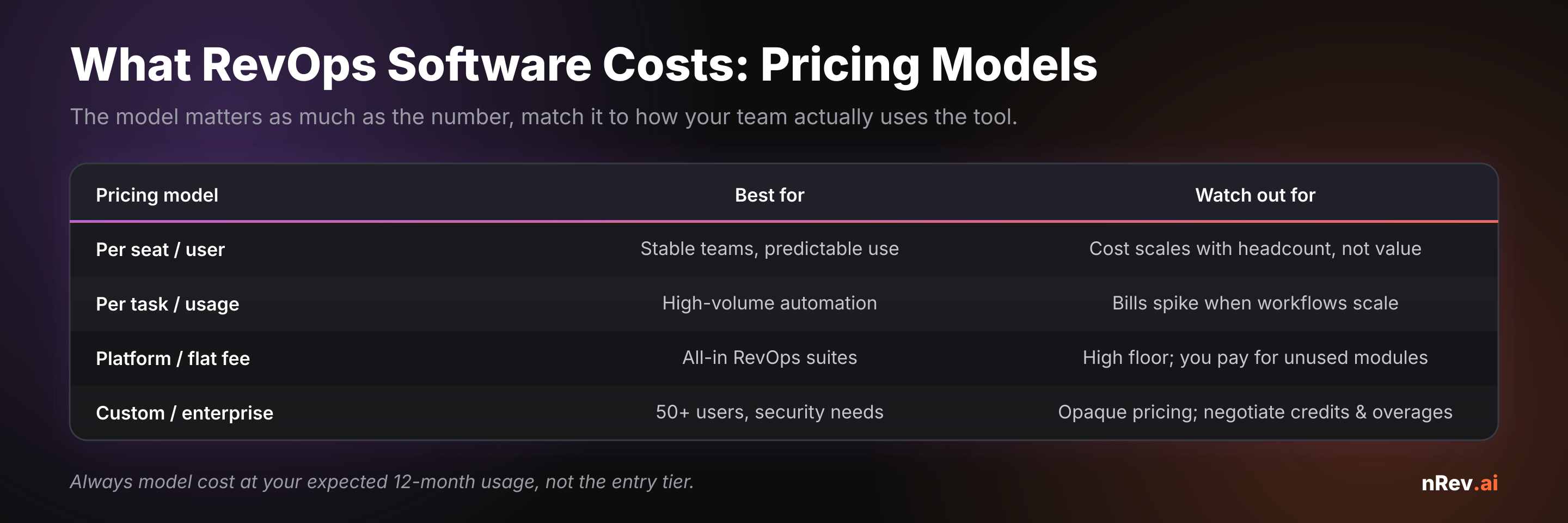
The cost pressure is also why consolidation matters. Salesforce found sales teams use an average of 10 tools to close deals, and 94% of organizations plan to consolidate their tech stacks. A RevOps platform that genuinely replaces three point tools can be cheaper than its sticker price suggests - and one that adds a fourth silo is more expensive than it looks.
The real number: total cost of ownership
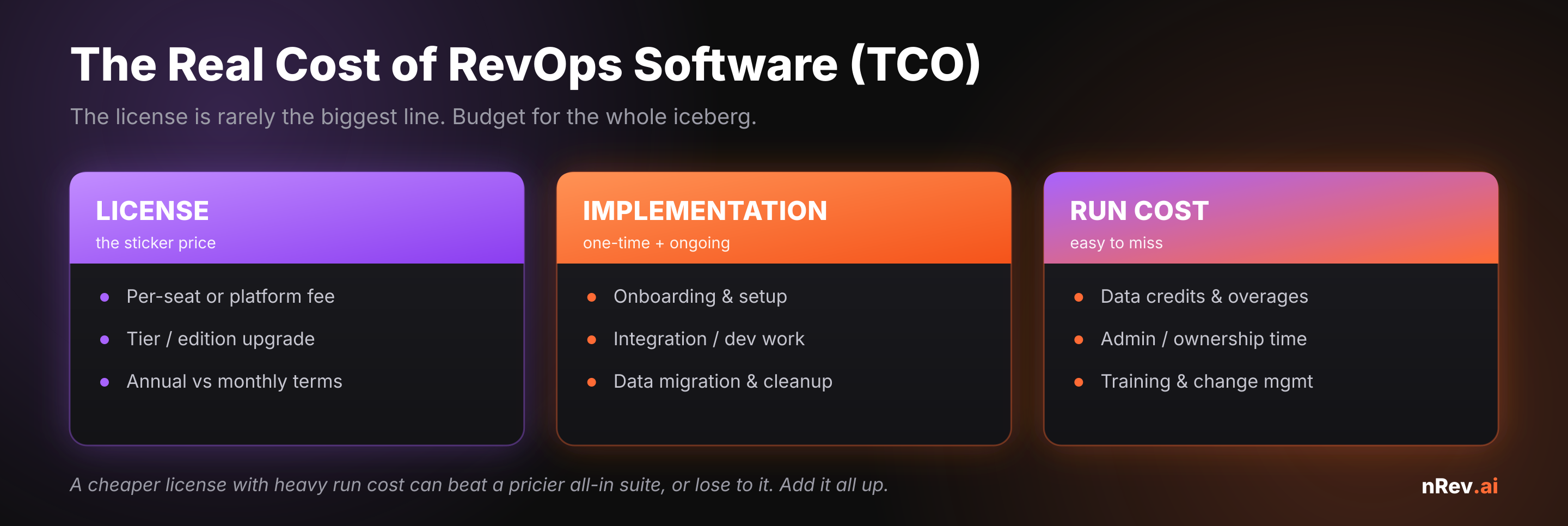
License is the line everyone compares and rarely the biggest one. Before you sign, add up the whole picture: implementation and integration work, data migration and cleanup, ongoing data credits and overages, and the admin time someone has to spend owning the system. A “cheaper” tool with heavy run cost routinely ends up pricier than an all-in suite - and sometimes the reverse. Model it out.
Build vs. buy vs. an all-in platform
Three paths, and the right one depends on your team, not fashion. Building on a generic automation tool gives you control but loads your ops or eng team with maintenance forever - viable only if you have that capacity. Buying a best-of-breed point tool for the one leak is fastest to value when your problem is narrow. An all-in RevOps platform wins when you have multiple connected leaks and want one system of record - but you pay a higher floor for modules you may not use yet. If you’re weighing a generalist automation tool against a purpose-built one, our breakdown of Make and Zapier alternatives for RevOps teams walks the trade-off in detail.
From framework to shortlist
Once you’ve scored the criteria, modeled the true cost, and picked your path, you’re ready to compare specific products against your rubric rather than their marketing. For the vetted options - including where each one fits by use case - see our roundup of the best revenue operations software and the broader go-to-market tools stack. Use those for the “which product” question; use this framework for the “how to decide.”
The RevOps layer that acts on your data, not just stores it
nRev AI is the GTM automation layer that sits on top of your CRM: it watches for revenue signals, enriches and routes them, and triggers the right play automatically - with human-in-the-loop guardrails on what it changes. You define the workflow; nRev runs it end to end, so alignment becomes something your stack does, not something you chase.
Build your first RevOps workflow →
RevOps software only compounds on a foundation that’s automated end to end — see how the pieces connect in our guide to GTM workflow automation.
Frequently asked questions
How do you choose revenue operations software?

How much does revenue operations software cost?
What’s the difference between per-seat and usage-based pricing?
Do small businesses need revenue operations software?
Should you build or buy RevOps software?