


Job change tracking means monitoring your contacts, customers, and champions so you know the moment one of them moves to a new company. It matters because a person who already knows and trusts your product, landing at a new account that fits your ICP, is about the warmest pipeline you can get. They don't need convincing that you're worth a look. They just need to hear from you before a competitor does. This guide covers why moves are such a strong signal, whose to track, how tracking works, and what to do when one fires.
Job change tracking, in one line: watching your known contacts for role changes so you can reach a trusted champion the moment they land at a new, in-market account.
Why job changes are one of the best buying signals
Two things happen when your champion changes jobs. First, you lose your contact at the old account, which is a reason to go re-establish the relationship there. Second, and more valuable, that champion arrives somewhere new with fresh budget, a mandate to make an impact, and permission to bring in tools they already trust. New leaders buy. They're expected to change things in their first few months, and they reach for what worked before. If that was you, the door is already open.
These are champion-movement signals, and they are worth watching separately from the rest of your signal stack.
Whose job changes should you track?
• Champions. The people who advocated for you internally. When they move, they're your warmest possible lead.
• Power users. Individuals who used your product daily and would miss it at a new company.
• Buyers and economic decision-makers. People who signed off before and can again.
• Lost-deal contacts. Someone who liked you but couldn't get budget at the old company might have both at the new one.
• Key accounts' stakeholders. Movement inside your target accounts changes who you need to know.
How job change tracking works
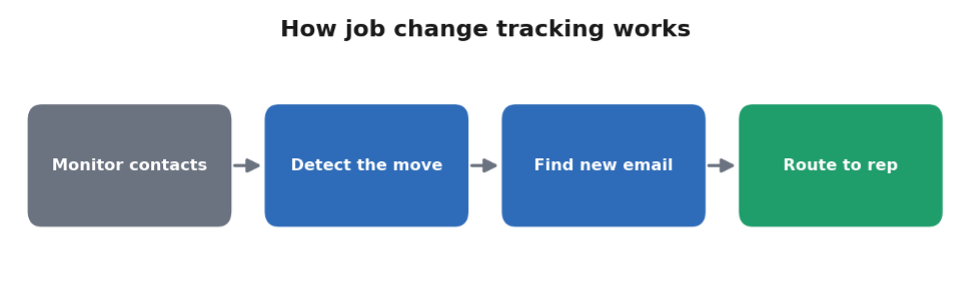
The mechanics are straight forward, even if doing it by hand is tedious:
You can track job changes free from a list of contacts without setting up a full workflow first.
1. Start with a list. Your CRM contacts, closed-won champions, and lost-deal contacts.
2. Detect the move. Compare each contact's current employer against what you have on file, usually by checking their LinkedIn orenriching their profile, and flag anyone whose company changed.
3. Fill in the new details. Find the new company, title, and a verified work email at the new employer.
4. Log and route it. Record the confirmed change and get it to the right rep so someone actually reaches out.
Every step is simple. The problem is that doing it manually across hundreds of contacts, regularly, isthe kind of chore that never quite gets done, which is why most job changes go unnoticed until it's too late.
What to do when a contact changes jobs
Move fast and lead with the relationship, not a pitch. A good first message congratulates them on the new role, references your history working together, and offers something useful, without immediately asking for a meeting. You've earned warmth here, so don't burn it by treating them like a cold lead. The window is widest in their first few months, before they've locked in a new stack, so speed matters.
Automating job change tracking with nRev
nRev's Contact Job ChangeTracker runs this whole loop on a schedule. It monitors a list of contacts, detects when someone's employer has changed, discovers the new company and title, runs waterfall enrichment to find a valid new work email, and logs the confirmed change. From there it hands into the same platform that can research the new account and draft a personalized, relationship-first opener for a rep to approve. So a move becomes a ready-to-send outreach, not a fact you find out about three months late.
It's often described as aUserGems replacement, and if you're comparing options, our roundup of the best UserGems alternatives lays them out. For the wider signal picture, B2B buying signals covers the full set, our Predict Leads with nRev writeup shows job changes feeding pipeline, and the signal-based outbound playbook shows the detect-to-outreach motion end to end. nRev's plays are shaped by more than 10,000 deployed GTM workflows.
Frequently asked questions
What is job change tracking?

Why are job changes a good sales signal?
Whose job changes should you track?
How do you track job changes at scale?
What should you say when a contact changes jobs?