


To see who viewed your LinkedIn profile, click Me, then View Profile, then open "Who's viewed your profile" (or go straight to that page). A free account shows only a short, recent slice of your viewers. LinkedIn Premium shows the full list from the last 90 days, plus how each person found you. Some viewers show up as "LinkedIn Member" because they browsed in private mode.
For B2B sellers and founders, that list is worth a lot more than most people treat it. A view from the right account is a buying signal you can act on. Almost every other article stops at"how to see your viewers," so this one does both: how to see them, and how to turn them into conversations that go somewhere.
How to see who viewed your LinkedIn profile
On desktop:
1. Click your Me icon (top right), then ViewProfile.
2. Find the "Who's viewed your profile"card in the left rail, or the analytics section on your profile.
3. Click it to open the full viewers list.
On mobile, tap your profile photo, then "Who's viewed your profile."
What you actually see depends on your plan:
• Free account: a limited view. Usually just your most recent handful of viewers, with very little history. Older viewers sit behind an upgrade prompt.
• LinkedIn Premium: the full list of everyone who viewed you in the last 90 days, plus where they work, how they found you(search, feed, and so on), and viewer trends over time.
What "Who's viewed your profile" means: a LinkedIn feature that logs members who open your profile. Free shows a recent subset. Premium shows 90days of history with viewer insights.
Why are some viewers anonymous ("LinkedIn Member")?
When a viewer shows up as "LinkedInMember" or "Someone at [Company]," they're browsing in private mode. LinkedIn lets anyone hide their identity while viewing profiles through their privacy settings. You can't unmask those viewers inside LinkedIn, and you should stay away from any browser extension or third-party tool that says it can. Most of them break LinkedIn's User Agreement, and they can get your account restricted or banned.
One thing to know before you go private yourself: if you browse in private mode, LinkedIn hides who viewed you too. It works both ways. To see your viewers, you have to stay visible to the people you view.
Can you see who viewed your profile without Premium?
Partly. A free account always shows a limited recent list, so you can see some of your viewers without paying. What free holds back is the full 90-day history and the viewer insights like company, source, and trends. That's the real Premium upgrade.
Be careful with "see all your profile views for free" tricks. The ones that claim to reveal anonymous viewers are usually the same tools that put your account at risk.Your safe options are straightforward: use the free list as it is, upgrade toPremium for full history, or, if your goal is sales rather than curiosity, use a compliant signal-based system that works off the viewers LinkedIn already shows you. More on that below.
Does LinkedIn tell someone when you view their profile?
Usually, yes. By default, when you view someone's profile, they can see that it was you, depending on their plan. If you'd rather stay hidden, switch your profile-viewing setting to private mode. Just remember the catch from earlier: go private and you lose your own "who viewed me" data.
Profile views are a buying signal, not just a vanity number
Now the part that matters for revenue. For a job seeker, "who viewed my profile" is curiosity. Fora B2B seller or founder, it's intent data sitting in plain sight.
Look at who tends to click your profile: someone who read your post, saw your comment, heard your name in a pitch, or is quietly sizing you up as a vendor. When that viewer works at an account that fits your ideal customer profile, the view is one of the warmest signals you'll get all week. They came to you. Most B2B buyers do their research long before they ever raise a hand, and a profile view is often that research happening in real time.
Warm also beats cold by a wide margin. Across thousands of GTM workflows nRev has run, warm-network signals like profile views, post engagement, and connection accepts convert roughly 3to 5 times better than cold outreach, because you're reaching someone who already knows you exist.
Why most profile views go to waste
Seeing your viewers was never the hard part. Acting on them in time is.A profile view is hot the day it happens and close to worthless a week later.We call it the buying-signal decay curve. The person who checked you out onTuesday remembers exactly why on Tuesday. By the next Monday the context isgone, and a generic "thanks for the view
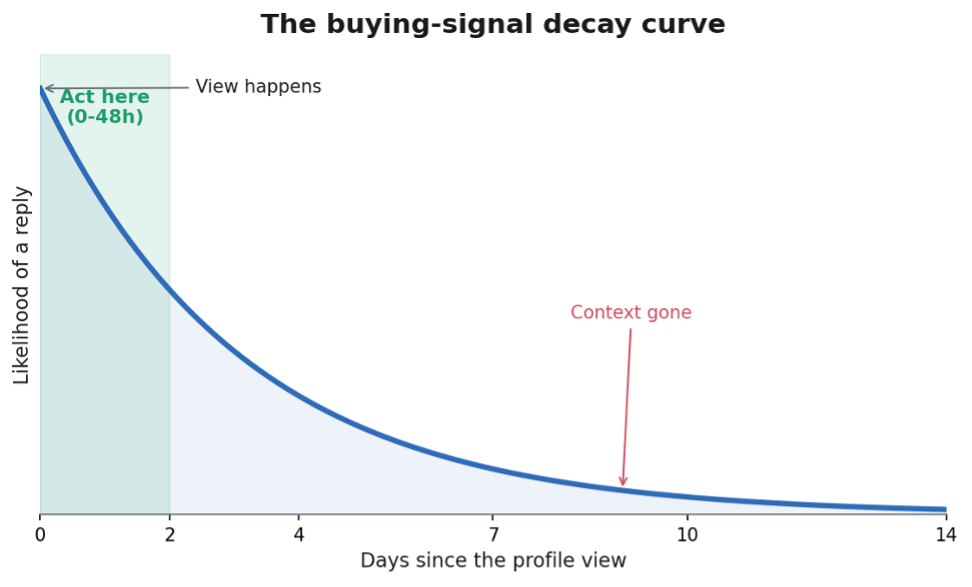
Most teams lose the signal in one of three ways:
• They never check the viewer list, or only glance at the free, cut-off version.
• They spot a great-fit account and still don't followup, because there's no system, just a mental note that fades.
• They follow up two weeks later with a templated pitch that ignores why the person looked in the first place.
The answer isn't "checkLinkedIn more often." It's a system that catches the signal and acts while it's still warm, without turning you into someone who refreshes a viewer list every morning.
How to turn profile views into pipeline (a simple 3-step system)
1. Capture the viewers that matter. Pull your recent profile viewers and filter down to people who fit your ICP: right title, right company, right size. Skip the noise, keep the decision-makers.
Profile views are only one warm list. You can also pull everyone who engaged with a post and work both together.
2. Add context before you reach out. A good first message points to a real reason you're connecting: a post they engaged with, something happening at their company, a mutual connection. Don't lead with a pitch. Our guide on what to say in a LinkedIn connection message walks through this.
3. Reach out while it's fresh. Send the contextual opener within a day or two of the view, then let it turn into a conversation instead of a sequence.
Do this every week and your profile stops being a billboard and starts being a source of pipeline. The hard part is consistency. Doing it by hand, every day, across every viewer, is exactly the kind of task people quit by week three.
How to do this at scale without manually stalking your viewer list
This is the point where automation actually helps, and also where a lot of "LinkedIn automation tools" go wrong by mass-blasting connection requests until the account gets flagged. The better approach is to automate the detection and the busywork, and keep the relationship human.
You can also monitor any LinkedIn profile for free, which is the same job done from the other direction.

That's how nRev's LinkedIn Growth Engine handles it. Using nRev's Get Profile Visitors capability, the workflow:
• Pulls the people who viewed your profile (connection degree, profile URL, view date) on a schedule, so nobody has to check by hand.
• Scores each viewer against your ICP, so only right-fitdecision-makers surface and the noise drops out.
• Researches the contact, including recent posts, role, and company context, so there's a real reason to reach out.
• Drafts a personalised opener built on that context, then routes it to you or your rep for approval before anything sends.
You approve every message. nRev just makes sure no high-intent view slips past the decay curve. It's the same idea behind nRev's broader Linkedin warm-network automation, where profile views, post engagers, and connection accepts all become timely, in-context outreach instead of missed signals.Profile views also feed Pillar 4 of your Social Selling Index, which is worth understanding alongside this.
Want to turn profile views into pipeline without the manual work or the account risk? Start free with nRev's LinkedIn Growth Engine and let high-intent viewers become warm conversations.
Frequently asked questions
Does LinkedIn show who viewed your profile?

How do I see who viewed my LinkedIn profile?
Can you see who viewed your LinkedIn profile for free?
Why do some viewers show as "LinkedIn Member"?
Does LinkedIn notify someone when you view their profile?
How can I see who searched for me on LinkedIn?
Are profile views worth following up on?